
 Polski
 Čeština
 Slovenčina
 Deutsch
 Italiano
 Español
How to start selling on Allegro: a complete step-by-step guide
Planning your expansion into CEE e-commerce and wondering how to start selling on Allegro? Launching on Central Europe’s dominant marketplace is one of the fastest ways to reach millions of active shoppers across Poland, Czechia, Slovakia, and beyond. In this guide, we walk you through setting up a seller account, navigating international business verification, and configuring your profile so you are ready to trade from day one – while avoiding common setup mistakes.
 Wojciech PiszczekCEO & Founder
Planning your expansion into CEE e-commerce and wondering how to start selling on Allegro? Launching on Central Europe’s dominant marketplace is one of the fastest ways to reach millions of active shoppers across Poland, Czechia, Slovakia, and beyond. In this guide, we walk you through setting up a seller account, navigating international business verification, and configuring your profile so you are ready to trade from day one – while avoiding common setup mistakes.
Is selling on Allegro worth it?
The short answer is yes. The longer answer is yes, provided you have a clear commercial strategy. Allegro is the undisputed leader in Central and Eastern European e-commerce, holding roughly 33% of the Polish market and expanding rapidly across CEE with dedicated local sites in Czechia, Slovakia, and Hungary. For international businesses looking to establish a foothold in the region, a presence on Allegro is essential.
Key reasons to list on Allegro
- High-intent existing traffic: The platform attracts over 21 million registered users. Rather than spending months and significant ad spend trying to build brand awareness in a new market, you tap directly into millions of shoppers who are actively looking to buy.
- Low barrier to entry: You do not need massive upfront capital or localized site development to test European markets. Creating an account is free, and creating listings is straightforward. It acts as a reliable testing ground to validate product demand without major capital expenditure.
- Immediate buyer trust: Regional shoppers know and rely on Allegro’s ecosystem, including its buyer protection scheme and the Allegro Smart! subscription scheme (which offers free delivery). As an entering international merchant, you leverage that established trust from your very first transaction.
- A gateway to broader CEE expansion: Selling on Allegro provides practical experience with regional customer preferences, logistics expectations, and cross-border operations, laying the ground for wider growth across Eastern Europe.
Naturally, there are trade-offs to consider. Selling on Allegro involves commission fees, competition can be intense, and price sensitivity means you need tight control over your margins.
However, for most expanding brands, Allegro provides the fastest route to revenue generation in the CEE region. Think of it as a channel to acquire customers who might otherwise never encounter your brand.
How to register an Allegro seller account: a step-by-step guide
Setting up a commercial seller account on Allegro is a straightforward online process. All you need is a computer, a business contact phone number, and your official company registration details.
Here is how to complete registration efficiently:
Step 1: Select the right account type
Head to the Allegro registration page and select Business Account (Konto Firmowe). A business account is required for commercial cross-border trade and gives you access to essential merchant tools, including Allegro Analytics, promotional badges, and bulk inventory management.
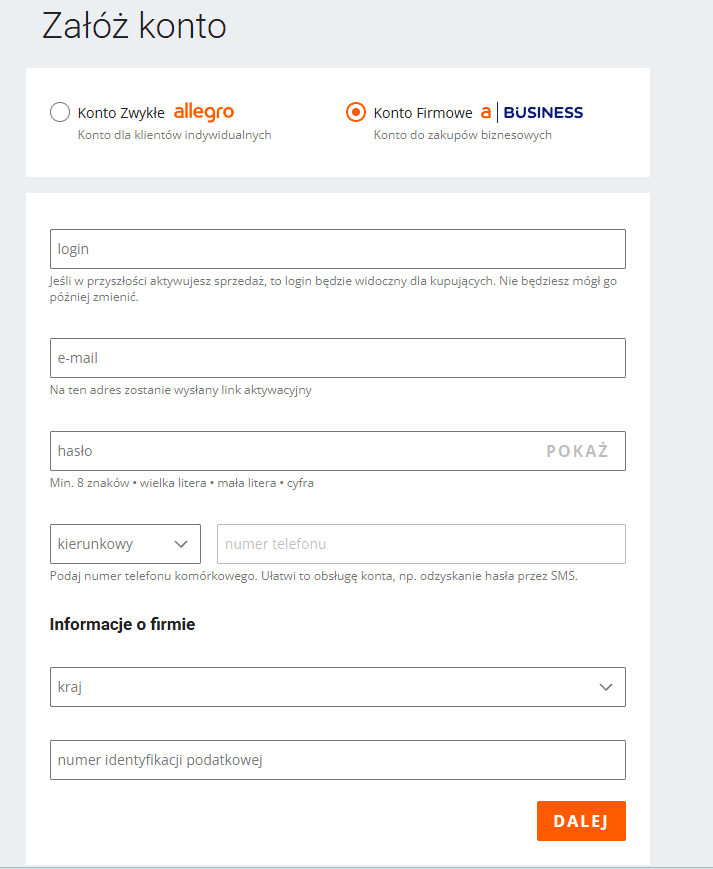 Choose the Business Account when registering on Allegro
Step 2: Choose a professional login and password
Enter your corporate email address, a secure password, and your contact phone number.
When choosing a username (login), remember that it will be visible to prospective buyers on your listings, invoices, and customer reviews. Avoid casual handles like seller_123 or john_uk.
Tip: Select a handle that reflects your official brand or company name (e.g.HomeBedding_EUorTechExpress). Use a corporate domain email (such assales@yourcompany.com) rather than a personal webmail address to present a professional image.
Step 3: Company details and tax registration
Enter your official company details, including your business name, registered corporate address, national registration number (such as your Companies House number or local trade registry code), and VAT identification number.
Because automatic database lookups only apply to domestic Polish entities, international sellers must enter these details manually. Ensure every detail matches your official company incorporation documents exactly to avoid verification delays.
Step 4: The activation link
Allegro will send a verification link to your registered email address. Click the link to confirm your email details, then log back into your business profile to finish onboarding.
Step 5: The verification transfer
To verify your corporate identity and bank details, Allegro requires a micro-payment verification transfer (typically 1.01 PLN, £1, €1, or $1, which is refunded once processing is complete).
International sellers can execute this transfer in their preferred currency using traditional bank accounts or business fintech services like Wise, Revolut Business, or Payoneer.
Important detail: The account holder name on the bank account initiating the transfer must match the registered company name on your Allegro profile word-for-word. If your bank account reads Smith Enterprises Ltd but your Allegro profile says Smith Retail, the automated check will fail. Always send the transfer from your primary corporate account.
Step 6: Document verification and approval
For entities registered outside Poland, completing document verification under KYC (Know Your Customer) and AML regulations is a mandatory step. Allegro’s compliance team will ask you to upload digital copies of official documentation:
- An official extract from your national business register (e.g. Certificate of Incorporation issued within the last 3 to 6 months).
- Proof of tax or VAT registration.
- A valid photo ID (passport or national ID card) of an authorized company director.
- A recent bank statement or bank account confirmation showing the company name and account details (IBAN/SWIFT).
Upload clear, high-resolution scans. Review and approval usually takes between 1 and 3 business days.
Step 7: Setting up payouts
Once verified, configure your payment processing options via PayU or Przelewy24. International merchants can receive payouts directly in EUR, CZK, HUF, or PLN into their designated bank accounts, preventing unnecessary currency conversion losses as you scale across Allegro’s localized regional platforms.
Account configuration: the foundations of selling
Once registration is approved, you need to configure your operational policies to meet marketplace standards and establish buyer confidence.
1. Delivery price lists: your logistics map
Shoppers expect clear, flexible shipping options. Under Delivery Settings, create shipping templates tailored to your dispatch capabilities.
- Essential options: Include popular regional parcel locker networks (such as InPost Paczkomaty) alongside recognized courier services (such as DPD, DHL, or GLS) for direct door-to-door delivery.
- Targeting Allegro Smart!: Ensure your delivery combinations meet the requirements for the Allegro Smart! badge. Offers featuring the Smart! tag convert at a significantly higher rate because delivery costs are covered for subscribers.
2. Return policies: setting clear terms
Cross-border buyers want clarity on how returns are handled before placing an order. In the Return Terms section, state your return window (the statutory requirement is 14 days, though extending this to 30 days builds stronger customer confidence) and provide clear instructions on return shipping.
3. Complaints policy: managing warranties and issues
Specify your claims procedure clearly in the relevant account tab. Outlining how damaged or defective items are handled demonstrates reliability and protects your account performance metrics.
4. Location and invoicing settings
- Dispatch location: Accurately set the origin location of your parcels (whether sending from your local warehouse or a regional CEE fulfillment centre). This ensures correct delivery estimates are calculated for buyers.
- Invoicing: Enable the option to issue VAT invoices. Many commercial customers filter search results exclusively for VAT-compliant sellers.
How much does it cost to sell on Allegro? Initial fees explained
Opening a seller account on Allegro involves no upfront registration fees or joining costs.
The platform operates on a pay-as-you-sell model, meaning most operational expenses are tied directly to completed transactions:
- Account creation and maintenance: £0 / €0 base charge.
- Category sales commission: Allegro charges a percentage-based commission on each item sold (typically between 6% and 12%, depending on the product category). This fee must be calculated into your product margins from the start.
- Allegro Subscription (optional but recommended): While not compulsory, operating professionally without a subscription can be restrictive. A Basic Subscription costs 49 PLN (approx. £10 / €11) per month and provides access to Allegro Analytics, sales tags, and store branding elements. Larger merchants can select the Professional Subscription at 199 PLN per month.
How to promote your listings on Allegro
With over 200 million active listings on the platform, relying solely on organic search traffic is rarely enough to build momentum quickly. To gain visibility, leverage Allegro’s native promotion tools:
1. Promoted listings: boosting search placement
Promoted listings (Wyróżnienia) place your products near the top of category search results with a distinct badge. While this incurs an additional feature fee per listing, unpromoted new items can struggle to gain traction against established listings with long sales histories.
2. Allegro Ads: targeted PPC campaigns
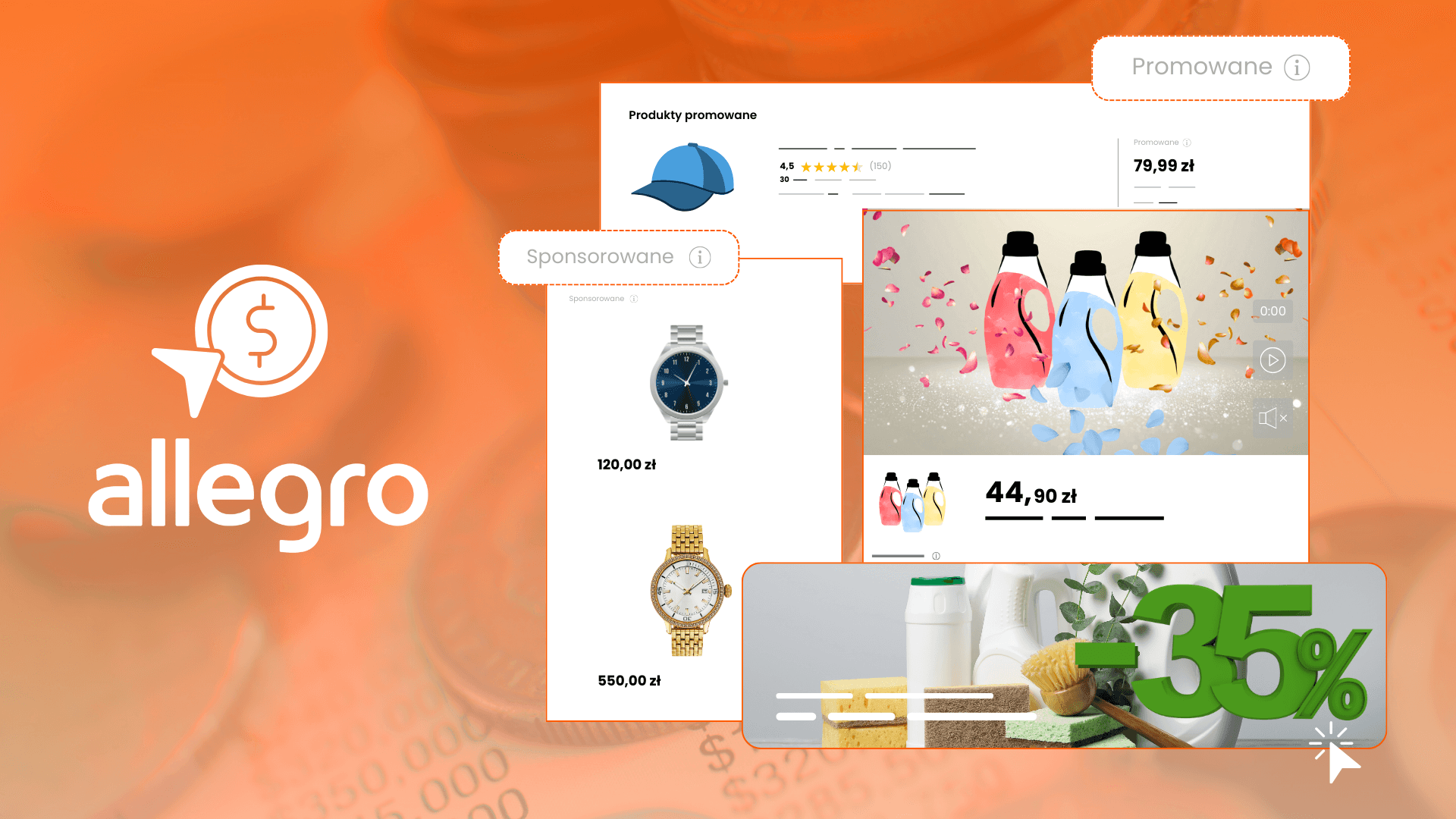
Allegro Ads is the platform’s native Pay-Per-Click advertising network. Operating on a Cost-Per-Click (CPC) model, it allows you to place products at the top of relevant search queries immediately, making it a valuable tool for generating initial sales history on new product lines.
Integrating Allegro with external management systems
To scale your CEE sales without increasing manual administration, link your Allegro seller account into your central e-commerce infrastructure:
1. Integrators: centralising your operations (e.g. BaseLinker)
An integrator acts as a central operational hub, linking Allegro with your primary ERP, warehouse management system, standalone webstore (such as Shopify, Magento, or WooCommerce), and courier accounts. When an order is placed on Allegro, stock levels adjust automatically across all channels, shipping labels generate in bulk, and invoices dispatch without manual intervention.
2. Autoresponders: maintaining response times
Fast response times are critical for maintaining good account health on Allegro. Autoresponder tools consolidate buyer queries across sales channels into a single dashboard and automate routine inquiries outside of business hours.
An independent webstore versus Allegro: which path should you choose?
This is a central question for expanding brands: why pay platform commissions when you can run your own site?
The reality comes down to customer acquisition costs:
- Selling on Allegro: Similar to opening an outlet inside a major shopping center. You pay platform commission, but you gain immediate exposure to millions of active buyers who are already on the site.
- Running a standalone webstore: Similar to opening a boutique on a quiet side street. You retain complete brand control and pay no marketplace fees, but you must invest heavily in traffic acquisition (Google Ads, Meta Ads, SEO) to attract visitors.
On Allegro, costs are variable and tied directly to generated revenue. On a standalone site, traffic generation costs are fixed upfront, regardless of whether a visitor converts.
The verdict: choosing the right model for your business
For most European merchants entering CEE markets, a hybrid approach offers the best balance of speed and risk management:
- Launch on Allegro first to validate regional demand, establish cross-border shipping workflows, and generate cash flow with minimal upfront acquisition spend.
- Reinvest CEE revenues into launching and marketing a localized standalone webstore once brand presence is established in the region.
Summary
Registering on Allegro provides a direct, structured route into Central and Eastern European e-commerce. However, creating an account is only the beginning – driving long-term profit requires listing optimization, active account management, and structured ad spending.
If you are planning your expansion into CEE and want to ensure your marketplace strategy is set up correctly from day one, book a free consultation with our team at Raise Your Sales today. We will evaluate your catalog potential and build a tailored launch strategy.
Did you find this article helpful?
This article has no ratings yet — be the first.
Autor
Wojciech Piszczek
CEO & Founder
I’ve been immersed in e-commerce for more than ten years, with a core focus on helping brands scale onto international platforms like Amazon, eBay, Kaufland, and eMAG. My experience covers the entire sales lifecycle—from high-level strategy and logistics to marketing and conversion optimisation. I help businesses not only enter new markets but scale sustainably, ensuring they avoid the costly pitfalls often faced by those just starting out.