
 Polski
 Čeština
 Slovenčina
 Deutsch
 Italiano
 Español
Allegro sales break: How to safely step away from your storefront
To successfully use the sales break feature on Allegro, you need to prepare your account properly – dispatch all pending orders, disable auto-renewal on your listings, and inform your customers about your temporary unavailability. A sales break can last up to 30 days and is configured directly via your Allegro dashboard. Keep in mind that even whilst on a break, you are still required to answer bu
 Kamil MarczukE-commerce Sales Specialist
This article provides a comprehensive guide to the sales break feature for Allegro sellers. You will learn exactly how to prepare your account and configure your pause in selling. We have also included ready-to-use customer service message templates that you can set up during your absence. With the right preparation, taking a break won’t harm your account metrics – in fact, returning fully refreshed can support your long-term business growth.
What is the Allegro sales break?
The Allegro sales break allows you to temporarily suspend your operations for up to 30 days when you cannot fulfil orders. During this time, all your active listings are hidden from buyers, meaning they simply cannot purchase your products.
However, there is a catch: whilst your sales are paused, your customer service cannot be. You must continue replying to buyer messages and actively resolving ongoing Discussions. Failing to manage these responsibilities will negatively impact your Sales Quality metrics, which can severely restrict your sales momentum once you return.
The evolution of the Allegro sales break
Historically, Allegro offered a slightly different feature (often referred to as ‘Vacation’ mode). In 2022, the platform revamped this system and introduced the modern sales break.
The old system simply displayed a banner informing buyers of your absence and extended estimated delivery times, meaning customers could still purchase your products. The current sales break feature takes a much safer approach: with one click, it completely hides your active listings. Furthermore, your storefront displays a clear notification about your break, including your planned return date.
How to prepare your account for a sales break
Before activating your break on Allegro, there are several crucial housekeeping tasks you need to complete to ensure a smooth transition.
- Fulfil outstanding orders: Pack and dispatch all pending orders to your courier.
- Fill in mandatory parameters: Ensure all your listings have their required parameters updated.
- Disable auto-renewals: Turn off the ‘Resume after ending’ option on your listings.
- Reschedule launches: If you had any product launches scheduled during your planned absence, push back their publication dates.
- Check for active auctions: Ensure you don’t have any ongoing bidding wars. If you activate a sales break, any active auction will end immediately, and the highest bidder will win.
- Set up an auto-reply: Use Allegro’s Autoresponder to handle customer enquiries whilst you are away. (You can find template messages further down in this guide).
- Time it right: Declare your sales break at least 60 minutes before you dispatch your final batch of parcels.
How to set up a sales break on Allegro: Step-by-step
To configure your break, you must log into the Sales Center. Please note that Allegro does not support this feature via API, so it must be done directly through the platform.
Navigate to the drop-down menu, select Sales settings, and then click on Sales break.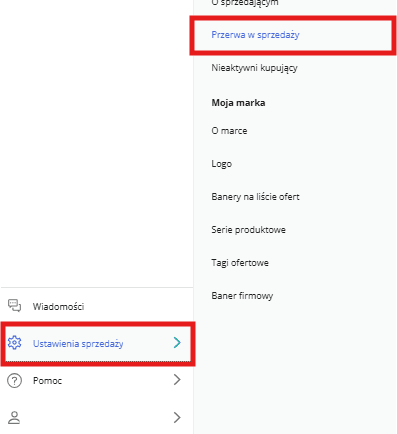
You will be redirected to a simple configuration page. First, Allegro displays a checklist of required steps before you can submit your request. If you have followed our preparation list above, you are ready to proceed.
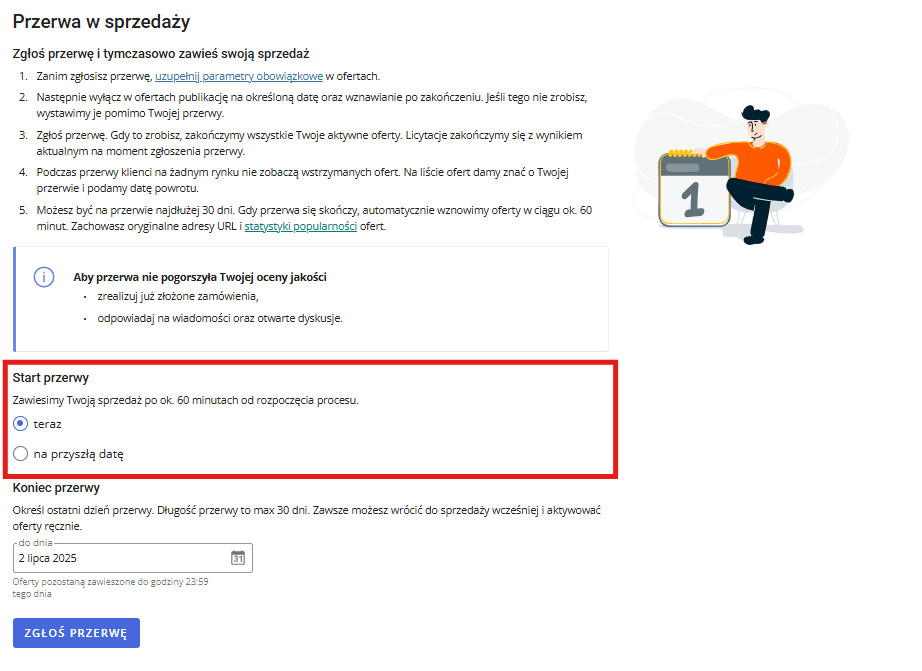
- Start of the break: Choose when your absence begins. You can select the current time or a date in the future. If you select ‘Now’, Allegro will suspend your sales within 60 minutes.
- End of the break : Set the date you plan to return. Remember, the maximum duration for a single break is 30 calendar days.
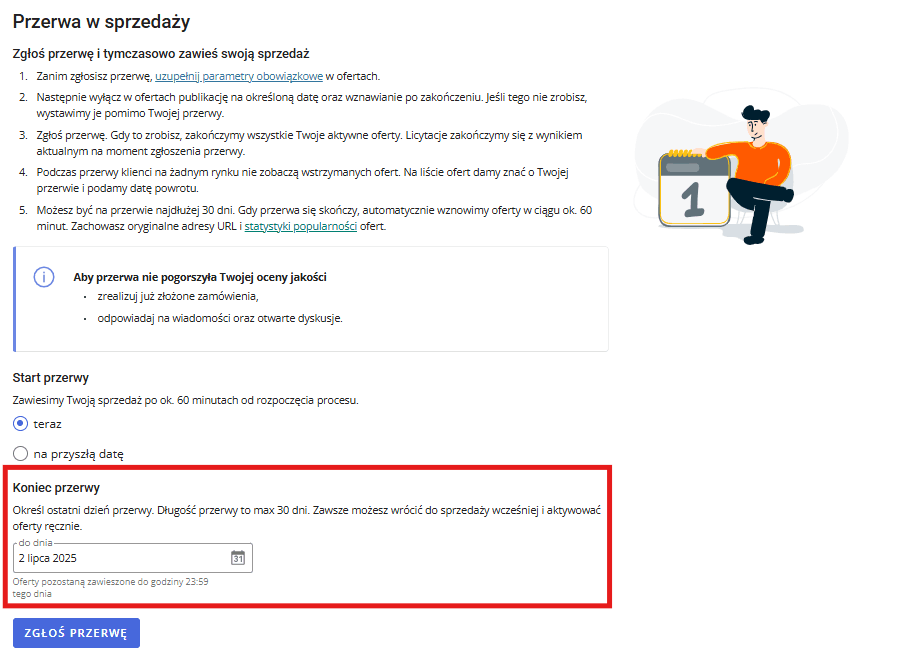
Once you have filled out both sections, confirm your choice by clicking the Submit break button at the bottom of the page.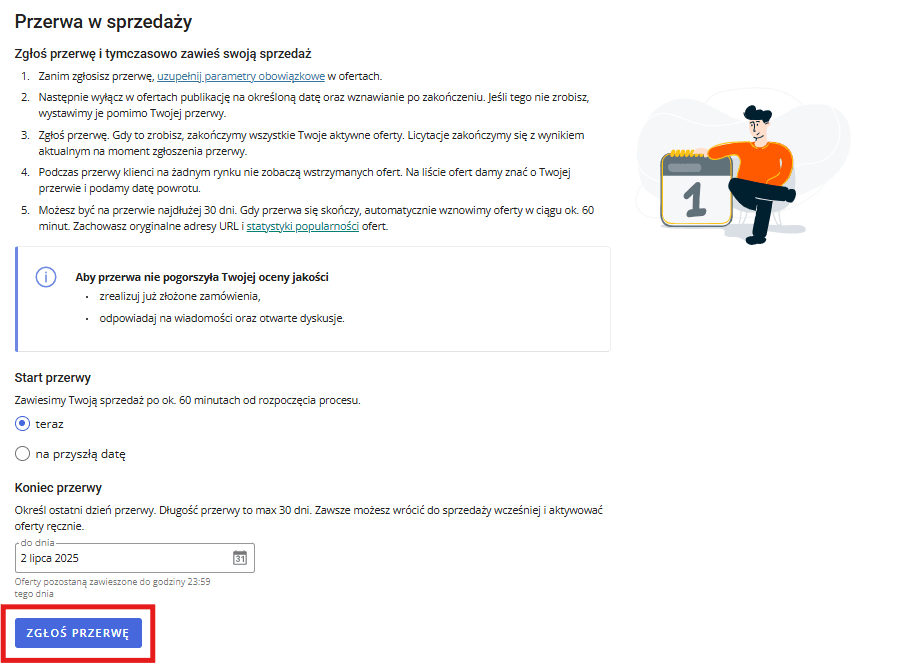
Congratulations! Your sales break is now fully configured. Your entire inventory will be hidden from buyers and will remain unavailable until you reactivate your sales.
How to resume selling after your break
Once your specified period ends (or after the maximum 30 days), your sales will automatically resume. Alternatively, if you are ready to get back to business earlier than planned, you can manually restore your listings.
Before reactivating your sales, double-check that all your listings are linked to the Allegro Product Catalogue and contain the required parameters. Missing these elements can prevent your listings from automatically unpausing, leading to unnecessary downtime.
To manually resume your operations, simply go to Sales settings, select Sales break, and click Activate sales.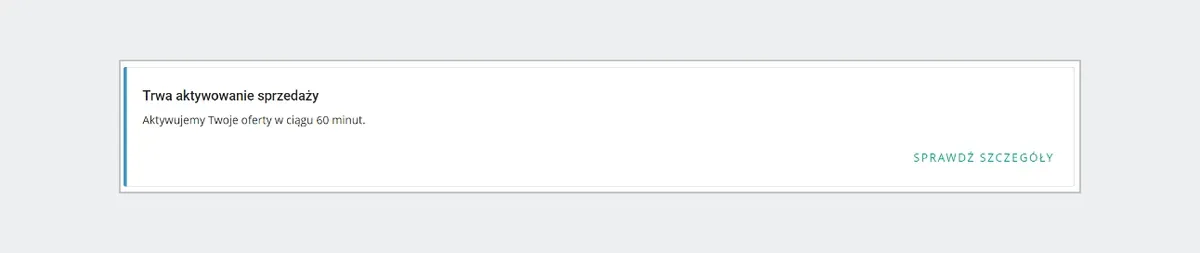
Important Note: You don’t need to turn off the sales break to create new listings or edit existing ones. You can comfortably work on your catalogue in the background. However, be aware that publishing a new listing or editing an existing one will automatically change its status to ‘Active’. If this happens, you will need to manually pause those specific listings, or simply deactivate and reactivate your global sales break. If you toggle the global break, keep in mind your listings might be visible for up to 60 minutes.
Auto-reply message templates for your customers
Even whilst on a break, keeping on top of customer messages and Discussions is mandatory. Discussions are complex and require a bespoke, manual approach – they cannot be fully automated. However, for standard buyer messages and enquiries, an auto-reply is your best friend.
Here are three professional templates you can use during your Allegro sales break:
1. The ‘buying time’ template (To manage expectations on response times):
Dear Customer,
Thank you for getting in touch. We are currently taking a short break from selling, which means it may take us a little longer than usual to reply to your message. Please be assured that we are doing our utmost to get back to you as quickly as possible.
Thank you for your patience and understanding.
Kind regards,
[Your Company Name / Your Name]
2. The ‘out of office’ template (To inform them you will reply upon your return):
Dear Customer,
Thank you for your message. Please note that our team is currently away on a scheduled break and will be unavailable until [Date].
Rest assured, your message has been safely received, and we will address all enquiries immediately upon our return. We appreciate your patience and will ensure your query is fully resolved.
Kind regards,
[Your Company Name / Your Name]
3. The ‘order status’ template (To reassure buyers about existing orders):
Dear Customer,
Thank you for contacting us. If your message relates to an existing order, please be advised that all purchases made prior to [Date] have been dispatched strictly according to schedule.
For any new queries or post-purchase support, we will respond to you as soon as we return to the office on [Date].
Thank you for your understanding.
Kind regards,
[Your Company Name / Your Name]
Summary
The Allegro sales break is an essential tool that allows you to temporarily hide your listings and pause your sales for up to 30 days. Unlike the outdated feature, your products are entirely hidden and cannot be purchased.
To use this feature safely, thorough preparation is key. Most importantly, you must remember that pausing your listings does not pause your customer service obligations—you still need to monitor messages and handle Discussions to protect your Sales Quality.
If you want to enjoy your time off without constantly checking your metrics, Raise Your Sales can help. Our comprehensive Allegro account management services ensure your business runs smoothly, so you don’t even need to hit the break feature. Get in touch with us today to book a free consultation, and start enjoying your downtime without stressing over your storefront’s performance!
Did you find this article helpful?
This article has no ratings yet — be the first.