
 Polski
 Čeština
 Slovenčina
 Deutsch
 Italiano
 Español
Allegro Product Series: Practical tips and tricks
Allegro product series are designed to help customers navigate your storefront and individual listings with ease. By grouping products into visual series, you can elevate the look of your offers and drive purchasing decisions. Ultimately, well-organised series can directly translate into higher sales figures.
 Kamil MarczukE-commerce Sales Specialist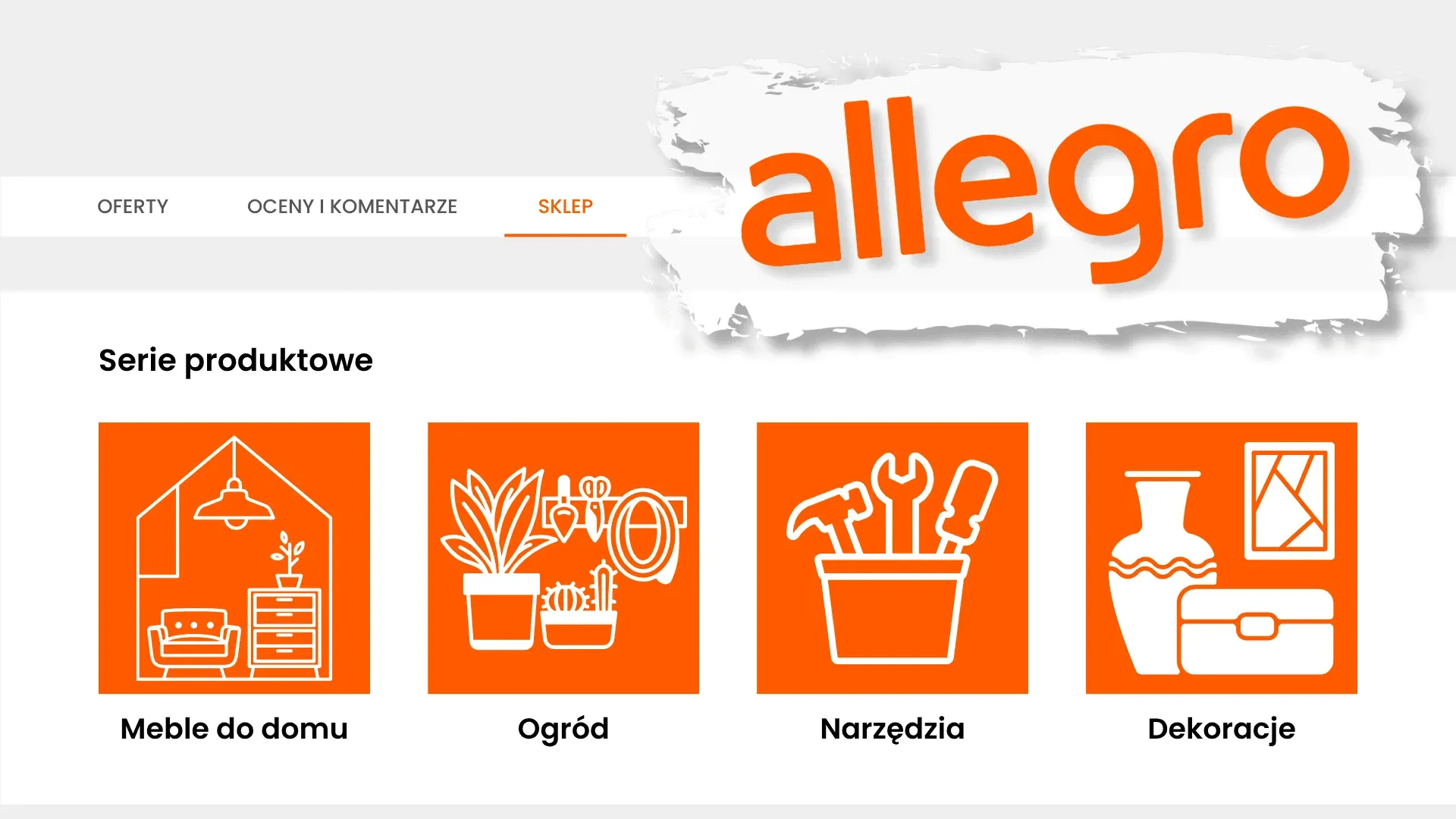
Looking for ways to make your Allegro storefront stand out and streamline the browsing experience for your customers? In this guide, I’ll explain exactly what product series are and how you can use them to make your storefront and listings much more appealing. You’ll find out what the prerequisites are, what assets you need to prepare beforehand, the core benefits of this feature, and step-by-step instructions on setting up your own. I’ve also included some actionable tips and a rundown of common pitfalls to avoid.
What are Allegro product series?
Think of product series as a visual navigation tool that allows you to group your inventory into bespoke categories. They are displayed as clickable graphic tiles directly on your storefront and across your individual listings. This setup provides shoppers with an engaging, easy-to-digest snapshot of your range, helping them navigate your shop with ease. When a buyer clicks a tile, they are instantly redirected to a specific, curated section of your Allegro store. Ultimately, if you manage a wide-ranging catalogue, product series are the perfect way to bring structure and clarity to your offerings while delivering a seamless shopping experience.
What do you need to set up product series?
The only technical box you need to tick to start creating product series is having an active Allegro Subscription. This is essentially a recurring fee that unlocks advanced seller tools. Allegro offers three subscription tiers, which vary in price and available features:
- Basic – At PLN 49.00 for 30 days, this tier unlocks core selling features, including the ability to build product series. It’s a great starting point for smaller sellers looking to tidy up their listings.
- Professional – Priced at PLN 199.00 per 30 days, this is the most popular choice. It comes with a comprehensive suite of tools, crucially including Allegro Analytics. This helps you track your sales performance and fine-tune your product series to match customer demand. Highly recommended for scaling businesses.
- Expert – Costing PLN 3,000.00 per 30 days, this package is tailored for high-volume sellers and top-tier brands that need advanced sales tools, priority support, and a dedicated account manager. Naturally, product series are included here, too.
While all three tiers support product series, we highly recommend the Professional subscription. It hits the sweet spot, giving you access to both the series feature and the invaluable insights provided by Allegro Analytics.
The benefits of creating product series
Grouping your inventory into product series can have a massive impact on your overall sales performance. Here are the key advantages of using this feature:
- They streamline navigation across your storefront and individual listings.
- They help drive up your bottom line.
- They boost brand recognition.
- They give you the freedom to design custom categories.
- They build trust and credibility for your shop.
- They add a premium, visual polish to your offers.
What to prepare before you start
It pays to do a bit of groundwork before you start building. Before we dive into the step-by-step setup, make sure you have the following sorted:
- A logical structure: Plan out how you want to divide your series, keeping your customers’ browsing habits in mind. Whether you group items by product type or by brand, stick to one cohesive strategy rather than mixing them up haphazardly. Map out your series names in advance and double-check that the categories make sense.
- Graphics: You’ll need cover images that accurately represent each product group and entice buyers to click. These image files must be under 100 kB, exactly 160 × 160 pixels, and saved in either .png or .jpg format.
- Product tags: You need to create product tags beforehand and assign them to the listings you want to feature in a given series. These tags act as the navigation framework for your Allegro storefront and serve as the destination links when shoppers click on your graphic tiles.
Once you’ve gathered these assets, you’re ready to start putting your product series together.
How to create product series
With your prep work out of the way, the actual setup is incredibly straightforward. The whole process is handled directly in your Allegro seller dashboard—the Sales Center. Just follow these steps:
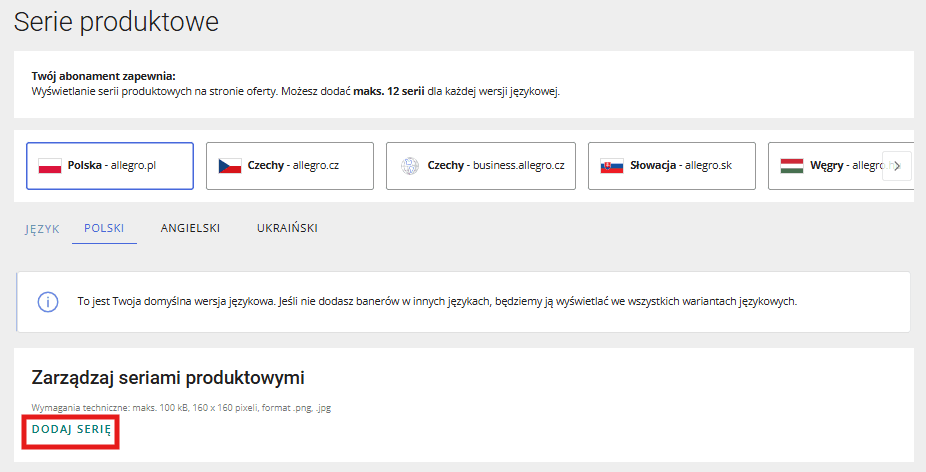
- In the Sales Center dashboard, scroll down to the bottom menu, select Sales Settings, and then click on Product series.
- Click on Add series.
- Upload your image, enter the series name, and paste the link to your list of offers.
- Confirm by clicking Add in the bottom right corner.
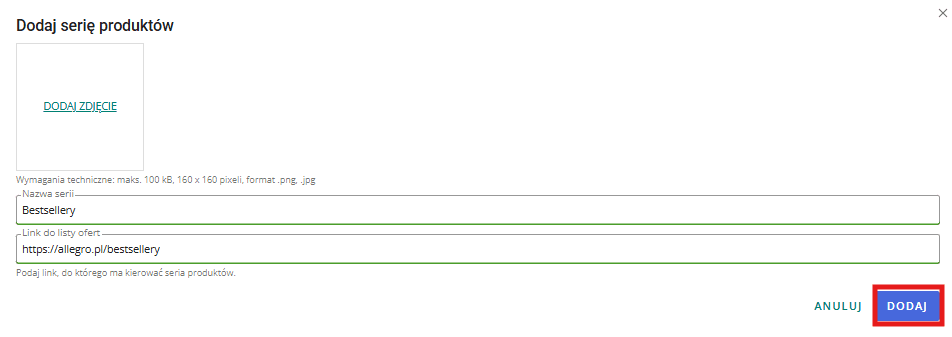
Spot on – you’ve just added your first product series. Now, simply repeat this process for any others you want to set up.
Good to know
Keep a few crucial things in mind when building out your series. I’ve rounded up the most important takeaways for you below:
Handy tips
- Map out your strategy. Design a layout that showcases your inventory in the best possible light. You have free rein over what series you create, but make sure the categories piece together logically.
- Optimise your tile count. You can set up a maximum of 12 product series. While you can choose any number, the tiles are displayed in rows of six. To keep things looking clean and visually balanced, aim for exactly 6 or 12 series.
- Use scroll-stopping graphics. Design images that actually entice the customer to explore your ranges. Don’t forget to keep the aesthetic aligned with your brand’s colour palette.
Common mistakes
- Low-res imagery. A 160 × 160 pixel tile is pretty small, so your graphics need to be crisp, clear, and carefully designed.
- A messy layout. Jumbling up brand names and product categories within the same grid looks unpolished. It’s far better to structure your layout neatly—for instance, placing 6 brand-based series on the top row and 6 category-based series on the bottom.
- Broken redirect links. If a link isn’t working, you’ll need to go back in, edit the product series, and swap it out for the correct URL.
- Odd tile numbers. Creating any number of series other than 6 or 12 can leave awkward blank spaces and ruin the aesthetic of your storefront.
Summary
Allegro product series are a highly functional, visually striking feature that helps you organise your listings and stand out from the competition. Setup is a breeze – all you need is an active subscription and a bit of prep. The payoff, however, can be massive, ranging from smoother storefront navigation and better conversion rates to stronger brand awareness. By leveraging graphic tiles and custom categories, you can showcase your catalogue in a clean, compelling way.
If you’re serious about driving sales and projecting a professional image, rolling out product series is an absolute no-brainer. Need a hand optimising your Allegro storefront or planning your broader European marketplace expansion? Book a free consultation with us, and let’s boost your sales together!
Did you find this article helpful?
This article has no ratings yet — be the first.