
 Polski
 Čeština
 Slovenčina
 Deutsch
 Italiano
 Español
eBay selling limits: What they actually mean and how to increase them
Have you just started your business on eBay and feel like you are ready to skyrocket, only to hit an invisible brick wall? That metaphorical barrier is known as eBay’s selling limits. While they might feel like a frustrating roadblock at first, they are actually just the first level in the game of scaling your brand on one of the world’s largest e-commerce platforms.
 Marcin TruchE-commerce Team Leader
In this guide to eBay selling limits, we will break down the definition of selling limits, why the platform uses them, and how to successfully request a limit increase to get your sales soaring. We will also share our agency’s battle-tested workarounds for when those limits won’t budge. Understanding how these restrictions work is the ultimate key to unlocking the full potential of your eBay seller account.
Why does eBay use selling limits?
Before we dive into how to increase your limits, it is important to understand why they exist in the first place. Since eBay introduced this system, it has served to protect buyers, genuine sellers, and the integrity of the platform.
- Building trust: To eBay, every brand-new seller is an unproven quantity. Low initial limits allow the platform to verify that you can reliably dispatch orders and provide a positive selling experience to your very first buyers.
- Transaction security: Selling limitations are a vital anti-fraud measure. They prevent bad actors from launching hundreds of fake listings overnight, taking the money, and vanishing.
- Sustainable growth: eBay wants you to scale at a manageable pace. A proven track record of positive feedback and smooth transactions on lower selling volumes is the best evidence that you are ready to handle more volume. By growing steadily, you build a much stronger foundation.
How to check your eBay selling limits
Before you can plan how to increase your account’s selling limits, you need to know where you currently stand. eBay restricts your account based on two key metrics: the total volume of active listings (item quantity) and the total monetary value of those items.
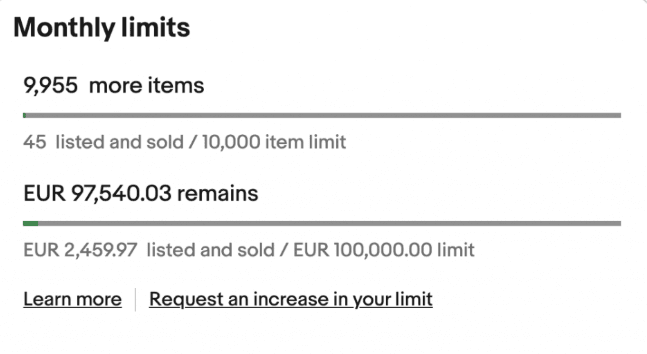
How to check your eBay selling limits
Detailed instruction
If you need help finding these numbers, simply follow these steps:
- Log in to your eBay account.
- Navigate to My eBay, then click on Seller Hub.
- Locate the Monthly limits section.
In this section, you will also see a direct option to request an increase. We highly recommend checking this dashboard regularly so you can proactively manage your selling capacity.
Proven strategies to increase your eBay selling limit
Now, let’s get to the core of the matter: how do you actually raise these limits? There are two main routes you can take, and they often work best in tandem. The key is simply proving to eBay that your operation is stable, reliable, and professional.
Path 1: Automatic limit increases
This is the most common way to get your limits raised. Every month, eBay automatically reviews your seller account. If you meet their performance standards, your limits will be bumped up without you having to lift a finger.
What does eBay look at during this review?
- Active listing volume: You are consistently listing items and getting close to your current limits.
- Positive feedback: Your customers are genuinely happy with their purchases and leave high seller ratings.
- No unresolved disputes: You handle returns and issues promptly, ensuring eBay never has to step in to resolve a case.
- High-quality service: Fast dispatch times, uploaded tracking info, and responsive communication are non-negotiable.
Path 2: Requesting a manual limit increase
If your current limits are holding your business back, your account health is in perfect standing, and the automatic increase hasn’t kicked in yet, you can take matters into your own hands.
In the Monthly limits section of your Seller Hub, click the Request a limit increase button. You will be prompted with an on-screen workflow.
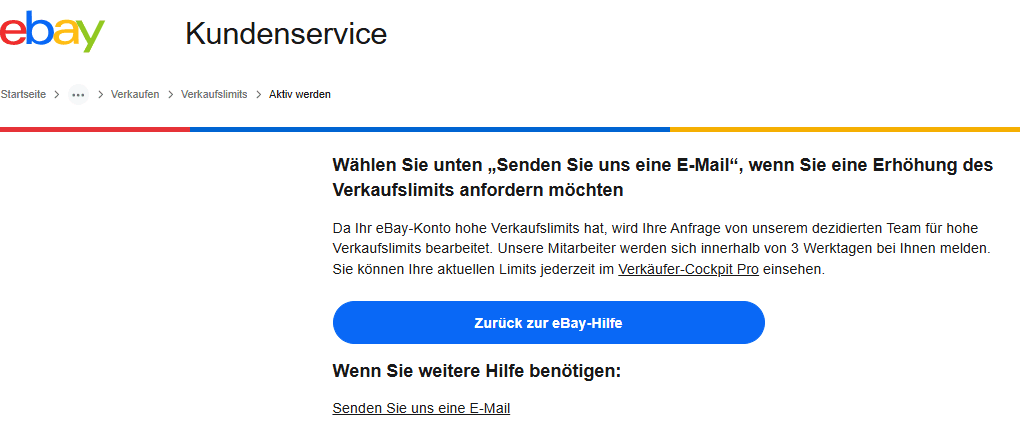
Contacting eBay support
However, in our experience, simply clicking that button does not always yield the best results. You will often have a much higher success rate by reaching out directly to eBay representatives via email or support tickets. Search for the selling limits topic in the eBay Help portal and use the contact option to write a professional request.
Path 2: Requesting a manual limit increase
Once you submit your request, eBay may reply asking for additional information. Be prepared to provide details about your suppliers, warehouse setup, stock levels, and business registration. Once you reply, they will review your application. Remember, securing a limit increase is a stamp of approval from eBay – it proves your business is viewed as trustworthy and highly professional.
FAQ: Frequently asked questions about eBay limits
What is the typical limit for a new eBay seller?
For new sellers, eBay limits are usually quite low. Quite often, a brand-new UK account starts with a limit of just 10 items or a total value of £650 per month. However, these figures vary significantly depending on your inventory, product category, and business location. We have set up client accounts where the initial limits were ten times higher from day one.
How often can I request an eBay selling limit increase?
You can generally only request an increase once every 30 days. The system will automatically block more frequent requests. The key is to maintain impeccable seller performance during those 30 days so you have a solid business case to present when you apply again.
What should I do if my request for an increase is rejected?
If you are stuck, we use a simple tactic to maximise the number of unique items on ebay we can list. We set the stock quantity of each eBay listing to just 2 units. This uses up very little of your total monetary value limit while allowing you to list a wider variety of items. It does, however, require close monitoring, as you will need to manually restock the listing quantity as soon as an item sells.
Does a business account guarantee higher limits?
It doesn’t guarantee them, but it dramatically improves your chances. Registering as a business proves to eBay that you are a serious seller. Verified business details and a VAT registration number are incredibly strong arguments for a limit increase.
Summary: Your roadmap to unlimited eBay sales
Proactively managing your seller limits is a cornerstone of any successful eBay marketplace expansion strategy. Instead of seeing them as a barrier, view them as milestones on your road to scaling. Every single limit increase is a testament to your brand’s credibility and a massive step toward reaching a broader global audience.
Your future growth on eBay depends entirely on your daily account management. Consistent sales, attention to detail, and top-tier customer service are your fast track to higher limits. Never forget: a higher selling limit on eBay is your gateway to international e-commerce success.
Contact our marketplace experts today to book a free consultation and let’s discuss how we can scale your brand across eBay, Amazon, and Europe’s leading marketplaces.
Did you find this article helpful?
This article has no ratings yet — be the first.
Autor
Marcin Truch
E-commerce Team Leader
I’ve been in e-commerce for over five years, starting in customer service before shifting my focus toward driving sales on webstores and marketplaces. Currently, my deepest expertise lies in managing Allegro and eBay accounts, while I’m constantly evolving my Amazon knowledge. I’m a big believer that user experience—specifically high-quality descriptions and visuals—is the foundation of a successful brand. In my spare time, I’m a petrolhead and a football fan; I’ve also recently rediscovered my love for LEGO thanks to my son.