
 Polski
 Čeština
 Slovenčina
 Deutsch
 Italiano
 Español
How to list items on Allegro: a practical guide
Allegro is one of Poland's largest online sales platforms, offering huge opportunities for e-commerce to private individuals and businesses alike. Listing an item is simple and does not take long. What takes far more time and energy is preparing the right materials, as they are the key to presenting a listing effectively.
 Kamil MarczukE-commerce Sales Specialist
In this guide, we show you how to list an item for sale on Allegro step by step: from choosing the right account and preparing your data to publishing your offer through the listing form, from a file or via the API. We also explain how much it costs, why Allegro sometimes won't let you add an offer and where we start when we prepare offers for clients who want to increase their sales on Allegro. If you are just starting out, take a look at our complete guide on how to start selling on Allegro, and if you would rather leave this task to specialists, see what professional Allegro account management involves.
Seller accounts: what to know before you list an item
You need an account to sell, and the type of account determines where and how you can do so. So before you start listing on Allegro, check which account suits your situation.
Types of Allegro accounts
A private account is intended for individuals and is usually set up for shopping or occasional selling. Anyone with this type of account sells on Allegro Lokalnie, because that is where they are redirected when they try to add an offer. You can convert a private account into a business account if you run a sole proprietorship or a limited liability company (sp. z o.o.) in which you are the sole shareholder, and you have not sold anything from that account in the last 24 months. In all other cases, you need to set up a separate business account.
A business account is designed for business owners, who can use it both to sell and to buy. It displays the “Company” label next to the username, goes through additional verification at registration, shows the company's details in its offers and comes with an automatically created billing account.
Do you need a business account to sell?
You don't need to set up a company to sell an item. If you only sell occasionally, you can create a private account, activate it free of charge by verifying your details and sell on Allegro Lokalnie. Bear in mind, however, that Allegro passes the details of sellers to the tax authorities if, in a calendar year, they complete at least 30 transactions or sell more than €2,000. This requirement comes from the DAC7 directive, which we cover in a separate article: what the DAC7 directive is and how it affects e-commerce.
If you plan to sell regularly and want to trade on Allegro as a business, a business account becomes essential, as it gives you tools that a private account lacks:
- the ability to issue invoices,
- access to tools that support your sales,
- access to advanced analytics tools,
- the chance to earn Super Seller status,
- the opportunity to build brand awareness,
- a welcome package for new business accounts.
Getting ready to list an offer
Some offer parameters and elements are mandatory, so it pays to prepare all the data in advance and make sure it is accurate and describes the product in full. Below, we list the elements you must fill in and those that are optional.
Mandatory elements:
- offer title and description,
- images (photos),
- other offer parameters, including:
- price,
- product parameters,
- EAN: not required in every category,
- product code,
- manufacturer details, details of the responsible person and product safety information (required under the GPSR),
- shipping price list,
- dispatch time,
- whether you issue invoices,
- stock level,
- returns and complaints policies,
- sales start date.
Optional elements: signature (internal reference), offer type (“Buy Now” or auction), warranty information, information about additional services, prices for Allegro's international marketplaces, wholesale discounts, offer promotion and the “Purchase notes (message to seller)” box. You can also attach PDF files to your offer, such as the product's user manual. If you want to sell by auction on Allegro rather than through a “Buy Now” offer, choose auction as the offer type.
How to prepare an offer that sells
Adding an offer takes just a few minutes, but whether the product actually sells depends on how you prepare the offer. Start by refining the title, photos and description. Allegro allows titles of up to 75 characters including spaces, and since May 2025 a title must contain at least 12 characters and 3 words. It makes sense to put the most important words, namely the product name, brand, model and key feature, at the beginning, because that is how buyers phrase their searches in Allegro's search engine. Allegro advises against repeating the same words, using decorative characters and adding phrases such as “okazja” (bargain) or “promocja” (sale), which say nothing about the product.
Parameters are just as important. Completed parameters help buyers find your offer through filters and increase your chances of a sale, so it pays to fill in all the fields, not just the mandatory ones. Photos should show the product from several angles, and the first one, which serves as the thumbnail, must meet Allegro's thumbnail requirements. The description, in turn, must cover only the product you are selling, because Allegro does not allow it to include information about other products, not even those in your other offers. A good description answers customers' questions on its own, before they even need to ask them.
This is exactly where we start when working with clients. For Lakma, a manufacturer of construction chemicals, we first reworked the offers to a single template, covering titles, content and photos, so that each one told a consistent story about the product. Better-chosen keywords in the titles also strengthened the Allegro Ads campaign, and within five months the brand's sales on Allegro grew fivefold. The full story is in our Lakma case study.
It was a similar story with Hoppline, a Hungarian distributor that sells products from many categories on Allegro, from furniture to pet supplies. We created a single offer template for them, made full use of the 75 characters available in the titles, improved the descriptions and organised the categories, while launching Allegro Ads campaigns in parallel. Just one month after we started working together, sales had grown by more than 50%, even though the shop ships its products from Hungary and cannot offer its buyers Allegro Smart! free delivery. You will find more in our Hoppline case study.
How much does it cost to list an item?
Adding an offer is free, and the main fee is the commission on sales. The exception is classified ads, for which Allegro charges a fee upfront covering their entire duration, with the amount depending on the category and the package you choose. Classified ads are published in the following categories: cars, motorcycles and quad bikes, trailers and semi-trailers, machinery, other vehicles and boats, services, live animals, and property.
If you turn on automatic relisting in the classified ad categories, the fees for the package, publication and add-ons will be charged each time the ad is relisted, unless you switch relisting off before then.
Commission and other fees
Apart from the fees for classified ads, there are several other costs to allow for on Allegro. The ones worth factoring in when you sell are:
- Sales commission: this depends on the category and the product price (a tiered model applies). Allegro uses a complex fee system, so rather than guessing, always use the official fee calculator to work out your margin precisely before you publish an offer.
- Offer promotion fees, for example for the Feature option: 19.90 zł for 10 days as standard, 5.90 zł or 2.90 zł for 10 days in selected categories, and 2.90 zł per day in the flexible version. Each of these amounts comes with an additional commission equal to 0.75 times the commission rate in the given category. You can read more in our article on Allegro Features and offer visibility.
- Other fees: for example, an Allegro subscription costing from 49 zł to 3,000 zł gross per 30 days, depending on the plan you choose.
You can always check the current rates in the fee schedule published on Allegro Help.
How do you list an item on Allegro?
You can list an item in several ways: manually using the form in Sales Center, in bulk from a file, or through the Allegro API, that is, by integrating Allegro with sales management software. For your first offer, the form is the simplest place to start.
Listing an offer manually using the form
To list a product manually, follow the steps below:
- Go to the My Assortment tab in Sales Center.
- In the top right-hand corner, click the Add new offer button.
- Search for the product in the Allegro database by its GTIN, EAN or ISBN code or by name (the option to search by name becomes available once you click My product does not have a GTIN (EAN) code).
- Select your product in the Allegro Product Catalogue. If you are listing a new product that is not on the list, select Continue without selecting the product at the bottom, and Allegro will take you to the next step.
- If you selected a product from the list, Allegro will automatically fill in most of the data and parameters based on the Catalogue. If you did not select a product, choose its category.
- Fill in all the information you prepared earlier, as thoroughly as possible. The offer preview becomes available once all the required fields are complete.
- Finally, click List product at the bottom of the page.
Once Allegro has verified your offer, it will be visible to buyers. To check whether it is already active, go to the My Assortment tab and search for it by its title or by the signature you set when adding it. An offer that buyers can see has the status Active.
Adding offers in bulk from a file
If you want to list a new batch of products and adding them manually would take too long, it is better to use a file. Follow the steps below:
- Go to the My Assortment tab in Sales Center and click the same button as for manual listing.
- Below the GTIN code search box, select List from file.
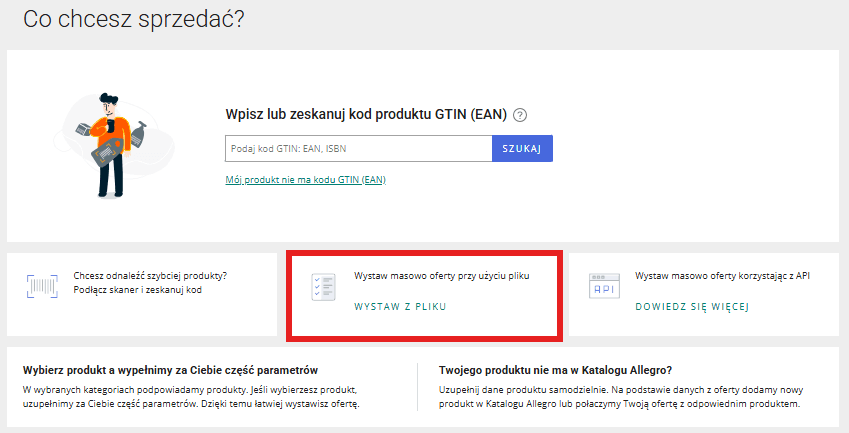 Listing offers in bulk from a file
- Choose one of the options and keep this tab open, as you will upload the completed file here later:
- Create Allegro file, if you want to fill in the file yourself with the data you prepared earlier. After choosing this option, select the product category.
- I have the Allegro file, which means uploading a ready-made file created with the first option.
- I have my own file (not from Allegro), which Allegro will process and then use to publish offers on your account.
- Fill in the file with the data you have prepared.
- Upload the completed file in the same place you downloaded it from.
Only businesses can use this route. The CSV file can be up to 5 MB and contain up to 10,000 offers; offers are created only for products that are already in the Catalogue, and they all get the same terms of sale, for example the same shipping price list and dispatch time. Allegro has announced that it will not develop the “List from file” tool any further and will switch it off in the future. Its successor is “Import & List”, which accepts a CSV file of up to 50 MB or a link to a file and also handles products that are not in the Catalogue.
Integrating with Allegro via the API
This is the fastest route if you have a large product range. External sales management tools such as BaseLinker, Selesto, Apilo or ErpBox store the data for all your products. Once you integrate such a tool with Allegro, that is, connect it via the API, you can publish offers straight from it. If you sell on several marketplaces, data you prepare once can be reused on each of them, and a connection to your warehouse updates stock levels in real time. That is why it is hard to manage without such a tool once you have a larger number of products.
Why can't I list an offer on Allegro?
In most cases, it comes down to one of four reasons. First, a private account cannot add an offer on the main Allegro marketplace and is redirected to Allegro Lokalnie instead, while a business account must first pass verification. Second, if the product is already in the Catalogue, Allegro requires the offer to be linked to it in some categories, and you won't be able to publish the offer without that link. Third, some brands are protected, and private accounts can only sell their products on Allegro Lokalnie. Fourth, Allegro may impose a sales restriction on an account, for example while it waits for an issue reported by a buyer to be clarified. In that case, you need to contact Allegro using the form for blocked accounts, and we explain how to prepare for this in our article on blocked Allegro accounts.
The most common mistakes when listing offers
Simply adding an offer is not enough. You need to do it effectively to attract potential customers and persuade them to buy. Here are the most common mistakes Allegro sellers make, and how to avoid them:
- Choosing the wrong category. Tip: check where your competitors sell similar products and use Allegro's suggestions when creating your offer.
- No keywords in the title. Tip: use specific names, features and words that will attract more customers.
- An inadequate product description. Tip: describe the product's features, benefits and uses, and use bold text and lists. Aim for a description that answers buyers' questions in advance.
- Unattractive photos. Tip: use bright, sharp photos on a white background that show the product from different angles, and make sure your main photo meets Allegro's thumbnail requirements.
- Incorrect or incomplete offer parameters. Tip: fill in all the available fields, as this improves visibility and sales.
- Poorly configured delivery methods. Tip: set clear delivery costs and remember to activate the Allegro Delivery package so that you meet the Allegro Smart! requirements.
- Automatic relisting without keeping an eye on costs. Tip: regularly check the status of your offers and your automatic relisting settings.
- Ill-considered pricing and a lack of competitiveness. Tip: check what prices your competitors charge on Allegro, and offer bundles or free gifts if you cannot compete on price.
- Out-of-date stock levels. Tip: use an integration with your warehouse system (e.g. Apilo, BaseLinker, ERP).
- An unclear returns and complaints policy. Tip: make your returns policy transparent, as Allegro rewards accounts that offer good customer service.
Frequently asked questions
Do you need an EAN code to list an item on Allegro?
Not always. You can search for a product by its GTIN (EAN) code, and if you don't have one, select the “My product does not have a GTIN (EAN) code” option and then search for the product by name or continue without selecting a product. In some categories, however, an EAN code is required, and when you add offers from a file, they are created only for products in the Allegro Product Catalogue, so having a code makes the job much easier.
Can you sell used items on Allegro?
Yes. When adding an offer, you select the product's condition, and the description and photos must show its actual condition, including any defects. Private individuals sell used items on Allegro Lokalnie, while businesses sell them on Allegro.
What happens when you exceed 30 transactions on Allegro?
Allegro will pass your details to the Polish National Revenue Administration (KAS) if, in a calendar year, you complete at least 30 transactions or sell more than €2,000, counted across Allegro and Allegro Lokalnie combined. The report is sent to the tax authority by 31 January of the following year. According to Allegro Help, the DAC7 directive does not introduce a new tax, only a reporting obligation, and whether you have to pay tax depends on your individual situation.
How do you list several offers on Allegro at once?
A business has two options. It can upload a CSV file in Sales Center, using “List from file” or the newer “Import & List”, or it can connect sales management software to Allegro and publish offers via the API. For a few dozen products, a file is usually enough, whereas for several hundred products and frequent stock changes, an integration works better.
Summary
Adding offers may seem simple, but it requires precision and good preparation. If you prepare your materials carefully and avoid the typical mistakes, you can reach a wide audience and increase your sales on Allegro. Remember to optimise your offers and make the most of the tools available, and your sales will become more profitable.
This guide gives you a solid foundation for starting to sell on Allegro. However, if you want to sell professionally with a well-thought-out strategy from the outset and avoid the mistakes that hold back growth in the early days, book a free consultation with us. We will show you how to organise your processes so that your business runs at full capacity from day one.
Did you find this article helpful?
Average rating 5.0 / 5 — 2 votes