
 Polski
 Čeština
 Slovenčina
 Deutsch
 Italiano
 Español
How to start selling on Kaufland: A beginner’s guide
Thinking about expanding your e-commerce business onto Kaufland but not sure where to begin? This step-by-step guide walks you through setting up and configuring your seller account, optimising your listings, managing inventory, and launching high-converting ad campaigns. Discover practical, expert tips to boost your sales and build a powerful presence on one of Europe’s fastest-growing marketplac
 Wojciech PiszczekCEO & Founder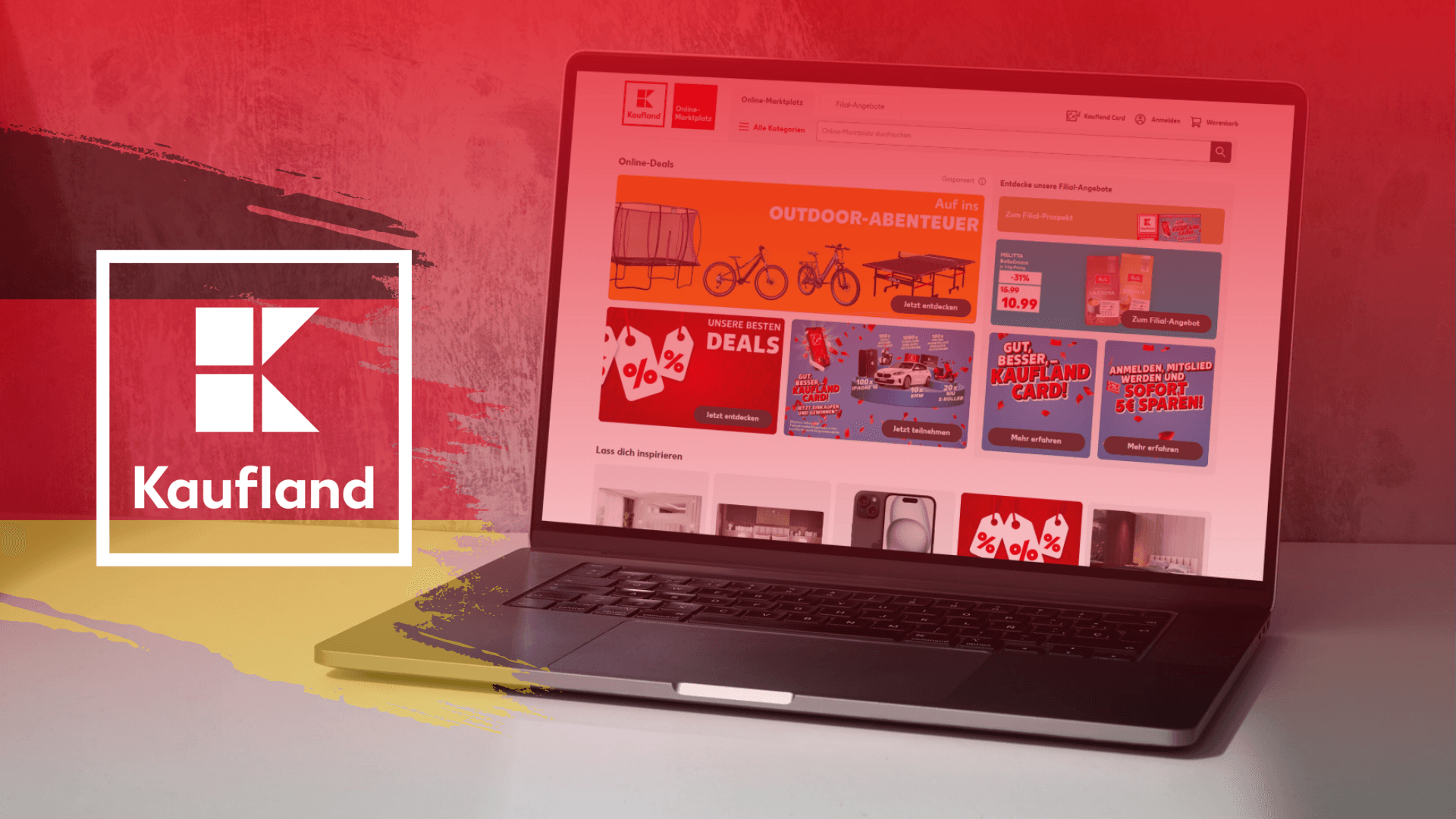
The first time I suggested Kaufland Marketplace to a client who was already killing it on Amazon.de, he looked at me like I’d lost my mind. “Kaufland? Isn’t that just a supermarket chain?”
That reaction is incredibly common. Many cross-border sellers still don’t realise that Kaufland is actually one of Germany’s largest online marketplaces, far transcending its brick-and-mortar grocery roots. That conversation made me realise just how many brands are completely missing out on a massive growth engine.
Why you should sell on Kaufland Marketplace
Selling on Kaufland – particularly on its flagship German platform (Kaufland.de) – is a phenomenal opportunity for any e-commerce brand looking to scale internationally and reach new audiences across Europe. Here is why you should consider adding Kaufland to your multichannel strategy:
A massive user base with immense reach
With millions of loyal consumers visiting the platform every single day, you gain immediate exposure to a massive audience. The German e-commerce market is one of the largest and most lucrative in Europe, and Kaufland gives you a direct ticket to one of the region’s biggest pools of digital buyers.
Low barrier to entry and competitive fees
If you want to escape the skyrocketing costs of competing on platforms like Amazon, Kaufland is a highly attractive alternative. Commission rates are often much friendlier, leaving you with healthier profit margins. On top of that, Kaufland provides various seller support programmes and tools to make your initial onboarding as smooth as possible.
An intuitive, user-friendly platform
Kaufland features a clean, straightforward back-end interface that allows you to list products quickly, manage inventory effortlessly, and track your sales metrics in real time. The system is built with user experience in mind, taking the headache out of daily operations.
Powerful, built-in advertising tools
Kaufland gives sellers access to a robust marketing toolkit designed to skyrocket visibility. From targeted product ads and special promotions to discount coupons, you have everything you need to grab buyers’ attention and drive conversions.
A massive variety of product categories
You can sell almost anything on Kaufland – from consumer electronics and fashion to home goods and niche groceries. This flexibility makes it an ideal fit for brands across various industries. Whatever you sell, Kaufland’s audience is actively searching for it.
How to register your Kaufland seller account
Required data and documents
1. Choose your subscription plan
- Basic Plan: €39.95 / month
- Basic Plan + Linking: €49.90 / month (allows you to add a direct link back to your independent online shop on your Kaufland storefront)
2. General company information
- Storefront name
- Estimated number of products you intend to list
3. Business details
- Official registered company name
- Legal business structure (e.g., Ltd, Sp. z o.o., GmbH)
- VAT registration number
- VAT OSS identification (if applicable, provide your OSS number)
- LUCID number (German packaging register registration)
- Commercial register number
- Registry court
- Names of managing directors / legal representatives
- Corporate website URL
- Official business address
4. Bank account details
- Account holder name
- IBAN
- SWIFT / BIC
5. Verification documents
- Valid IDs/passports of all authorised corporate representatives
- An official extract from the Commercial Register (e.g., Companies House, KRS)
- Ultimate Beneficial Owners (UBOs): Full name, date of birth, place of birth, residential address, % of shares held, and a shareholder agreement or proof of ownership.
- Point of contact: Name, email address, and phone number of the person Kaufland should reach out to for administrative matters.
The step-by-step registration process
The initial portal setup requires navigating through these specific steps:
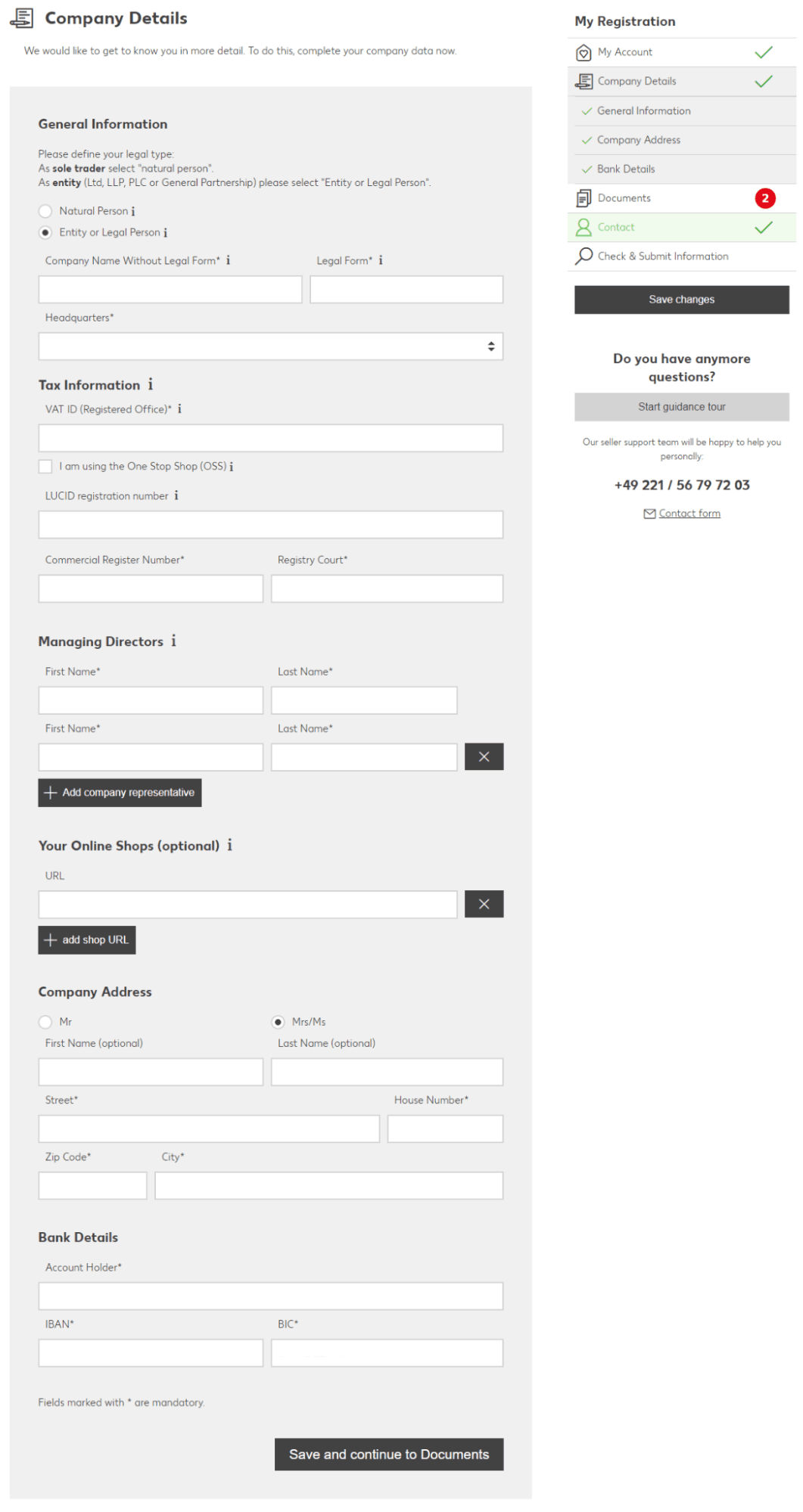
Company Details
My Online Shop at Kaufland.de
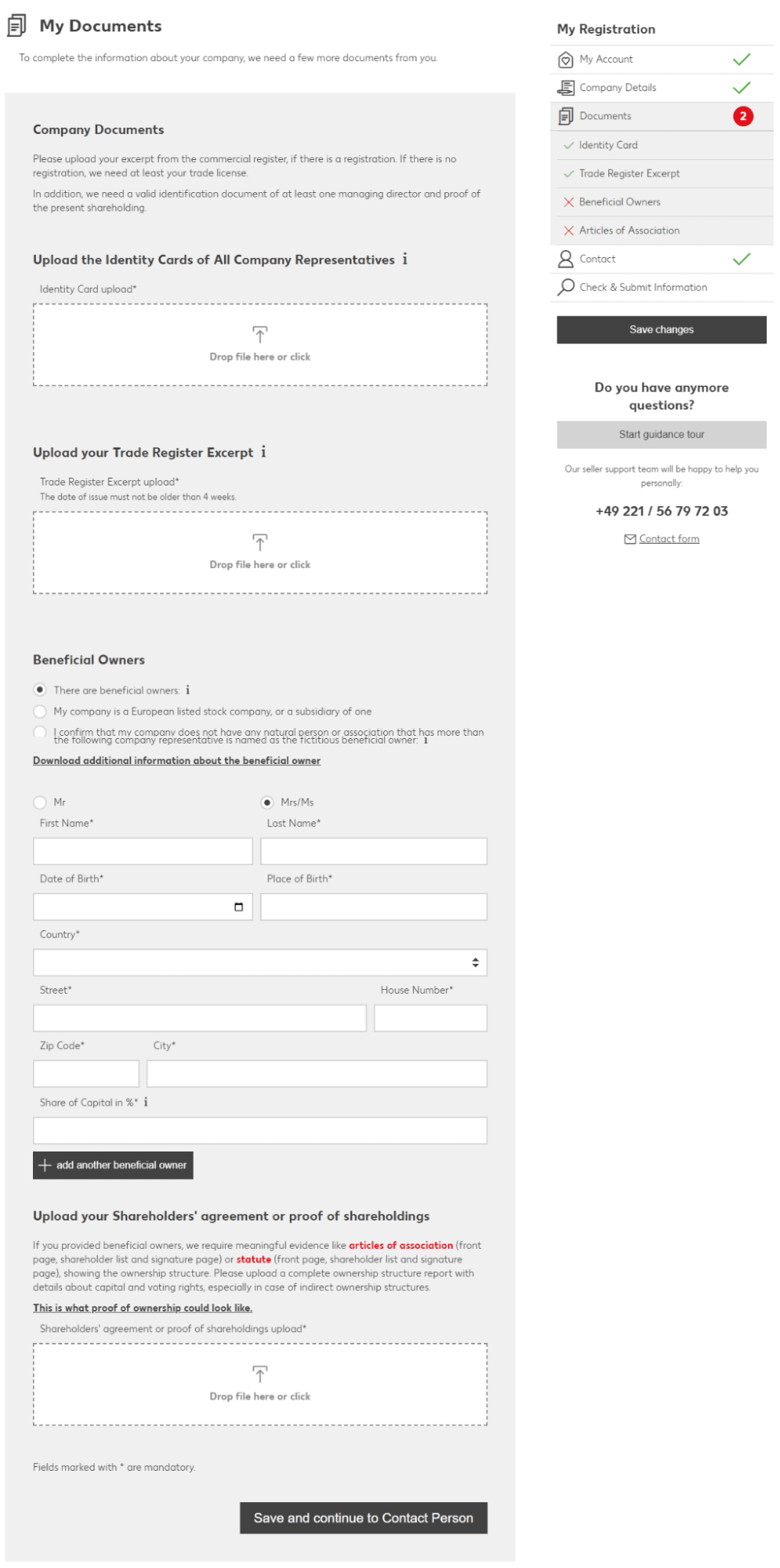
My Documents
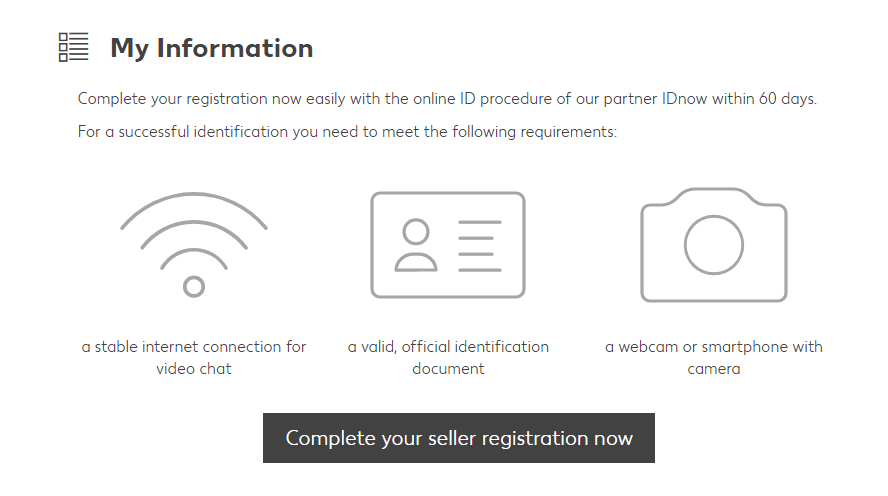
Verification
Configuring your Kaufland account settings
Before your products go live, you need to configure your backend settings properly:
- Shipping groups: Set up your fulfilment profiles. Define your order cut-off times, target delivery countries, shipping rates, and multi-item discounts. You can also specify a minimum order value for free delivery thresholds.
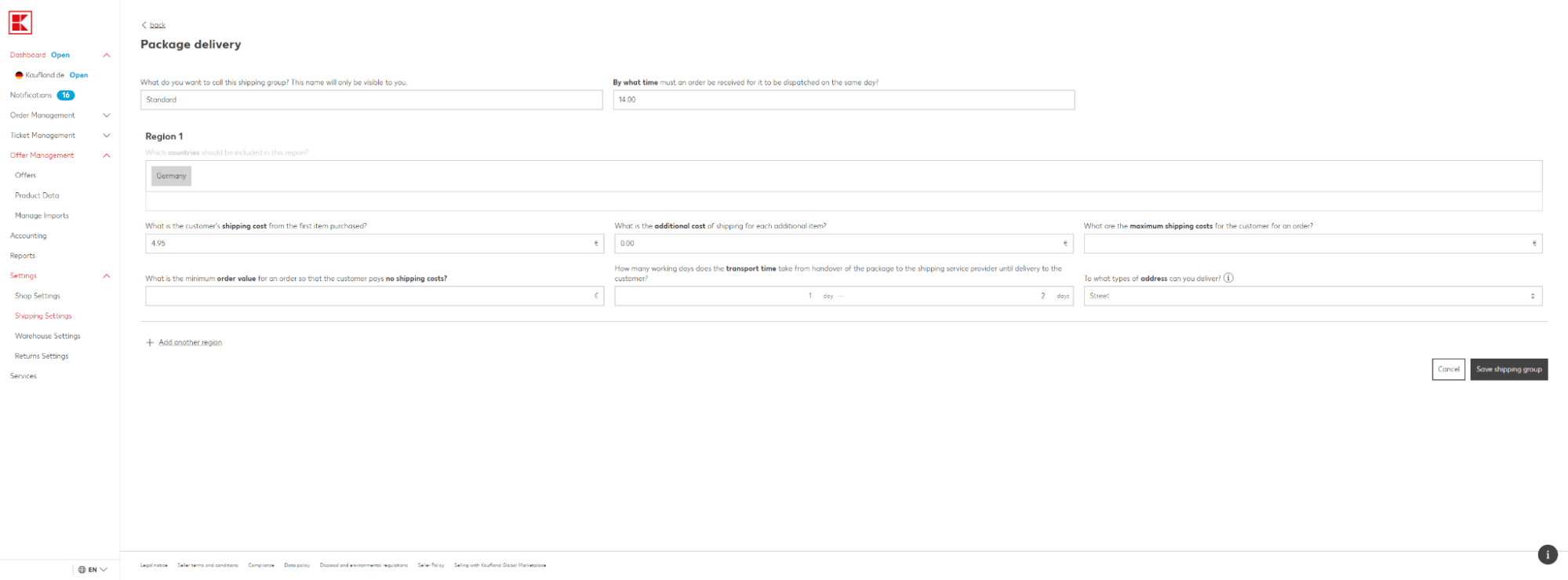
Shipping group
- Shipping times & destinations: Set your accurate lead times and specify whether you deliver to residential addresses only, or also to DHL Packstations and Packshops.
- Tax information: Enter your local tax ID or VAT number. If you use the EU’s One-Stop Shop (OSS) scheme, make sure this is filled out.
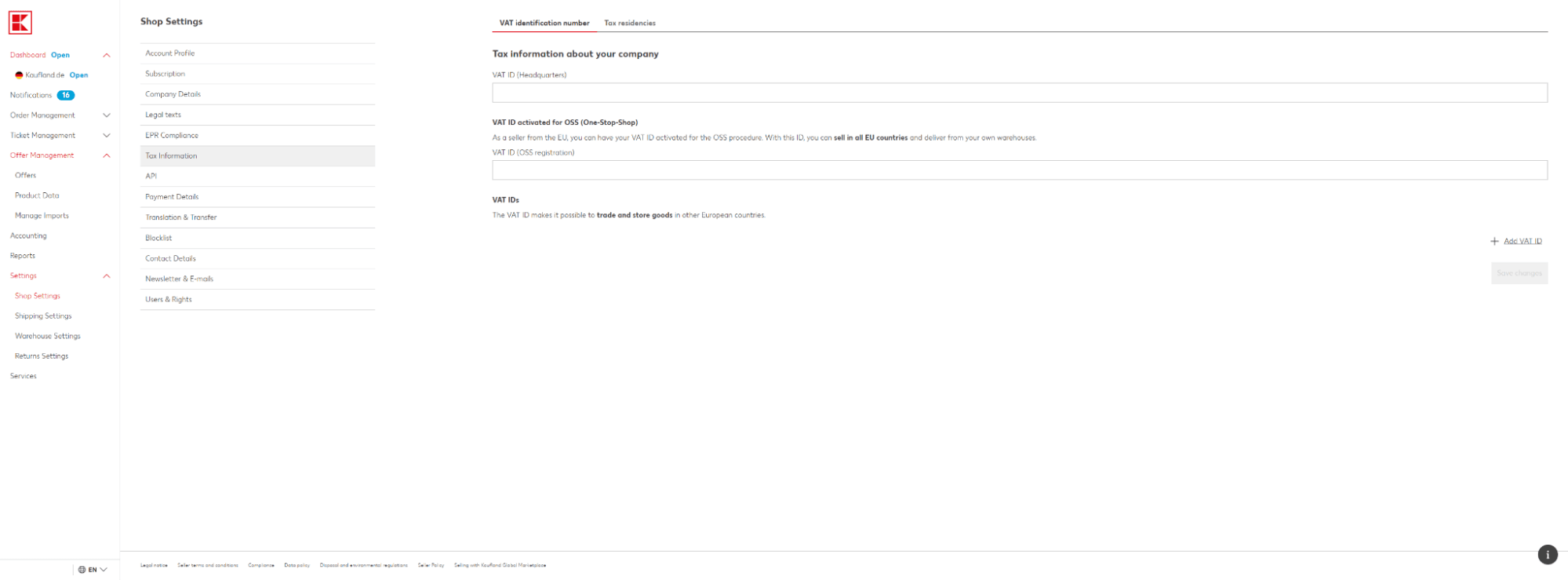
Tax information
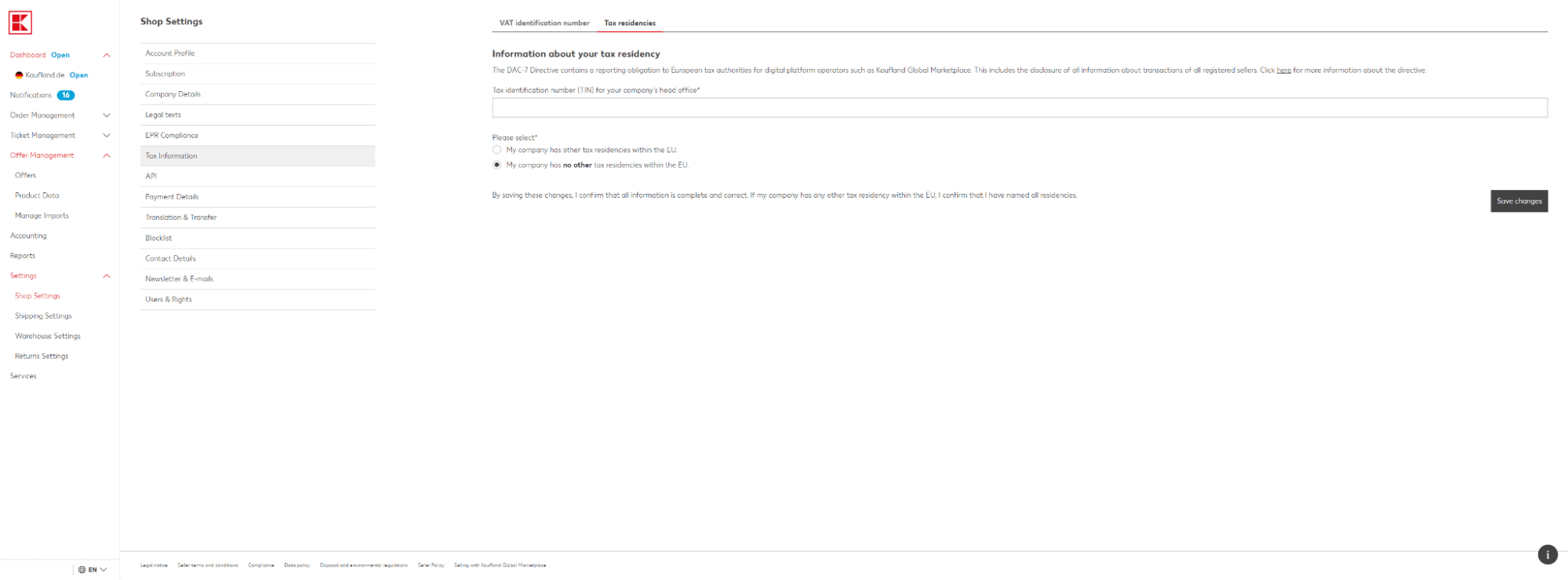
- Tax residences: Provide your Taxpayer Identification Number (TIN) and specify any tax residencies outside the EU, if applicable.
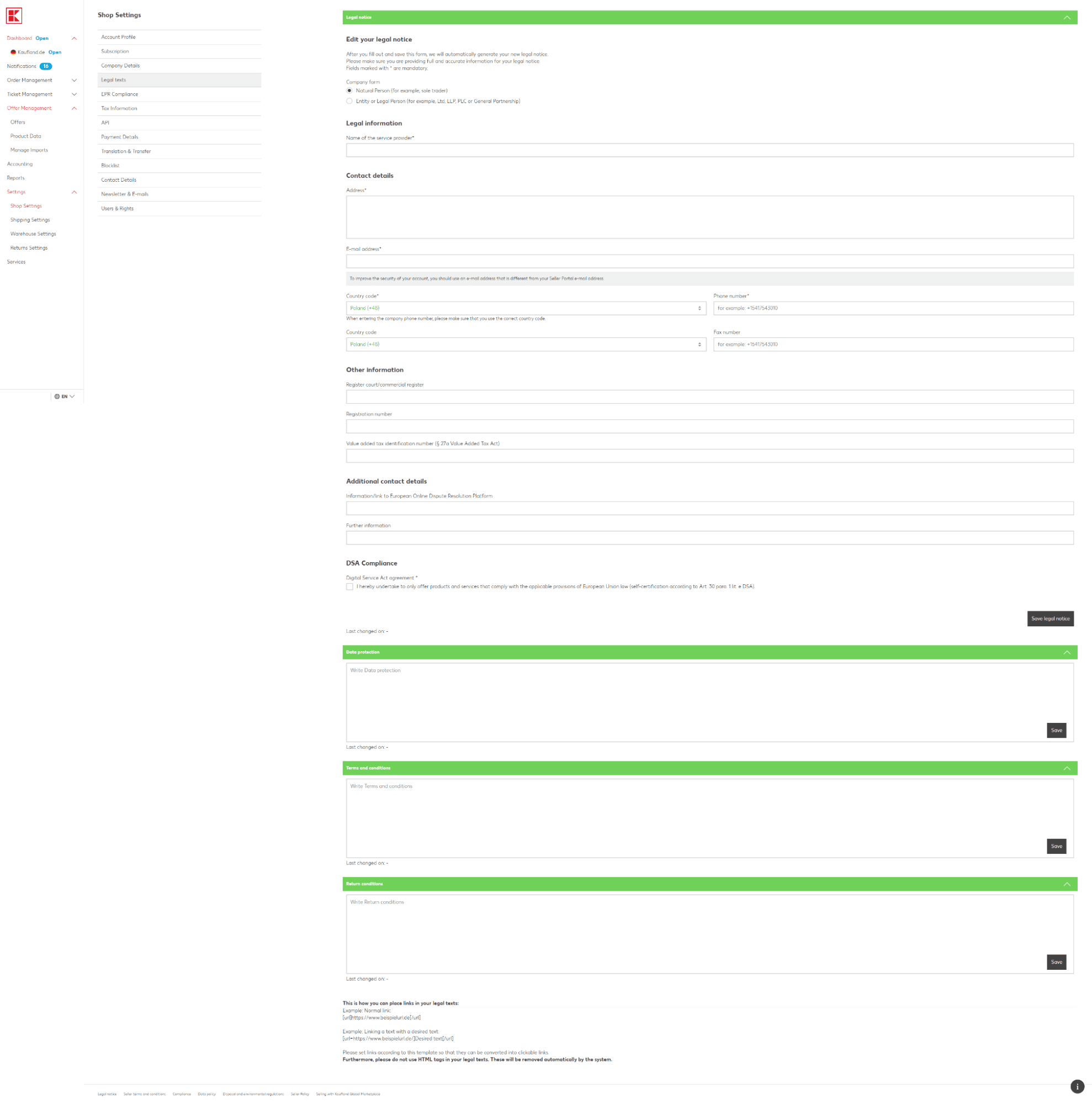
Tax residency - Legal texts: Upload your mandatory legal notices, including your Company Legal Notice (Impressum), Data Protection/Privacy Policy, Terms and Conditions (T&Cs), and your Returns Policy.
Legal texts - Company verification: Input your German LUCID packaging register number and upload the official confirmation certificate.
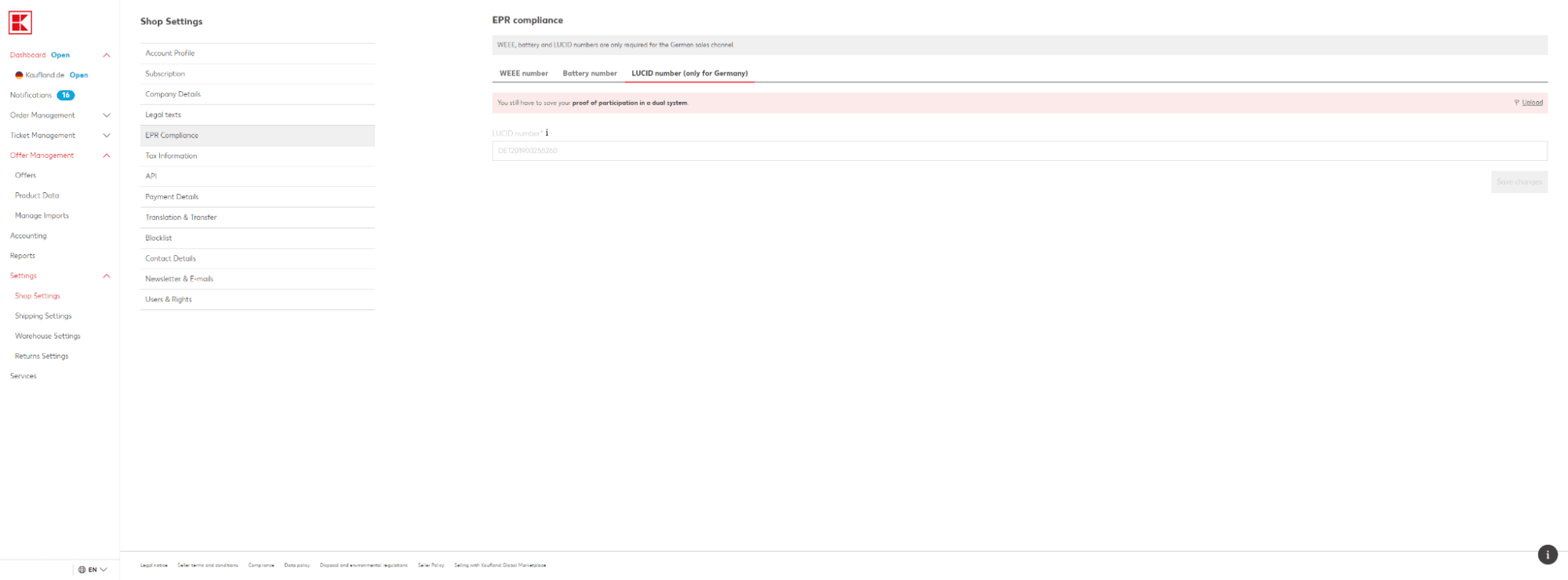
Company verification - Return address: Specify where customers should send returns.
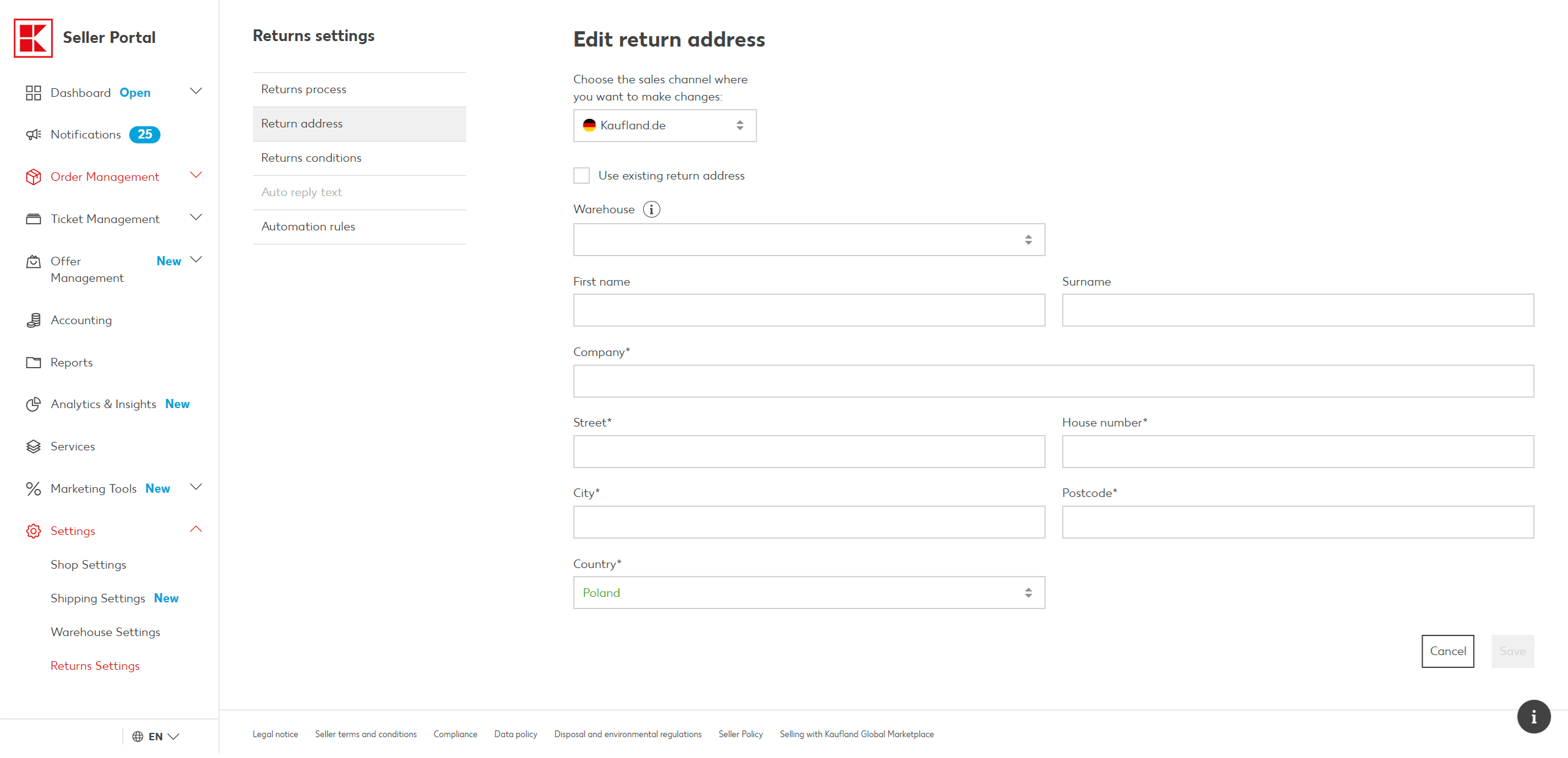
Return address - Warehouse location: Provide the physical address of the warehouse your goods are dispatched from.
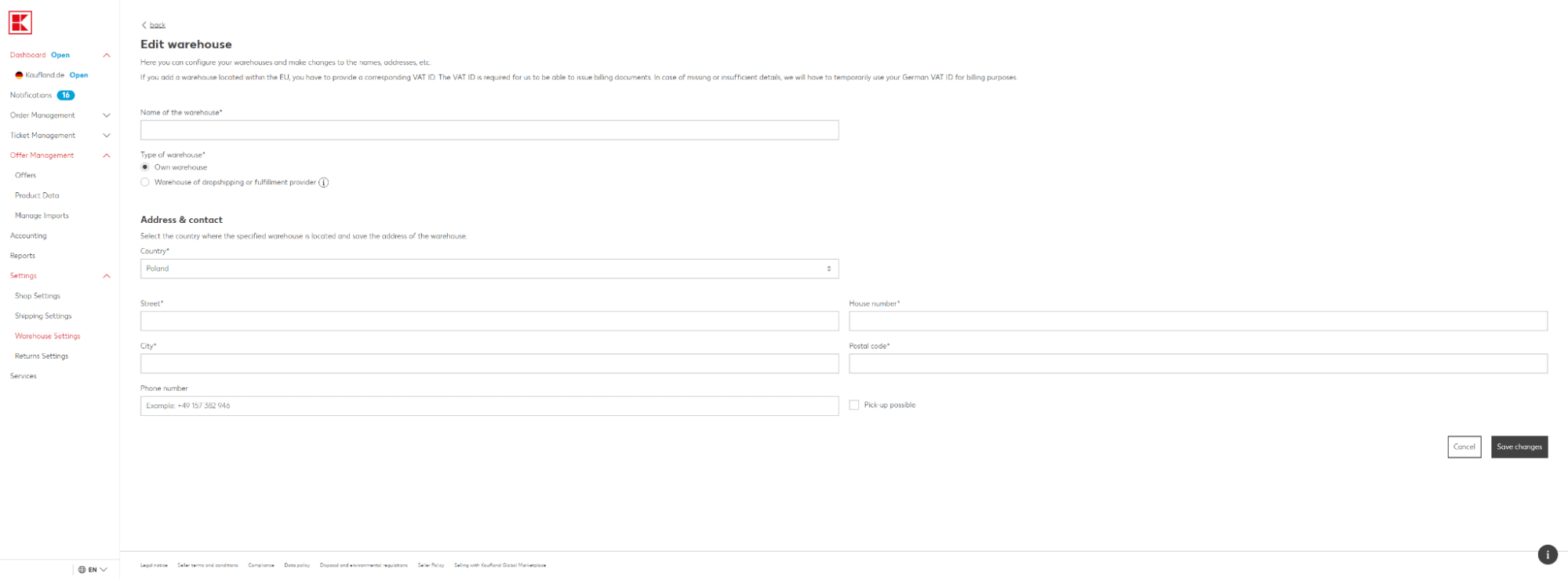
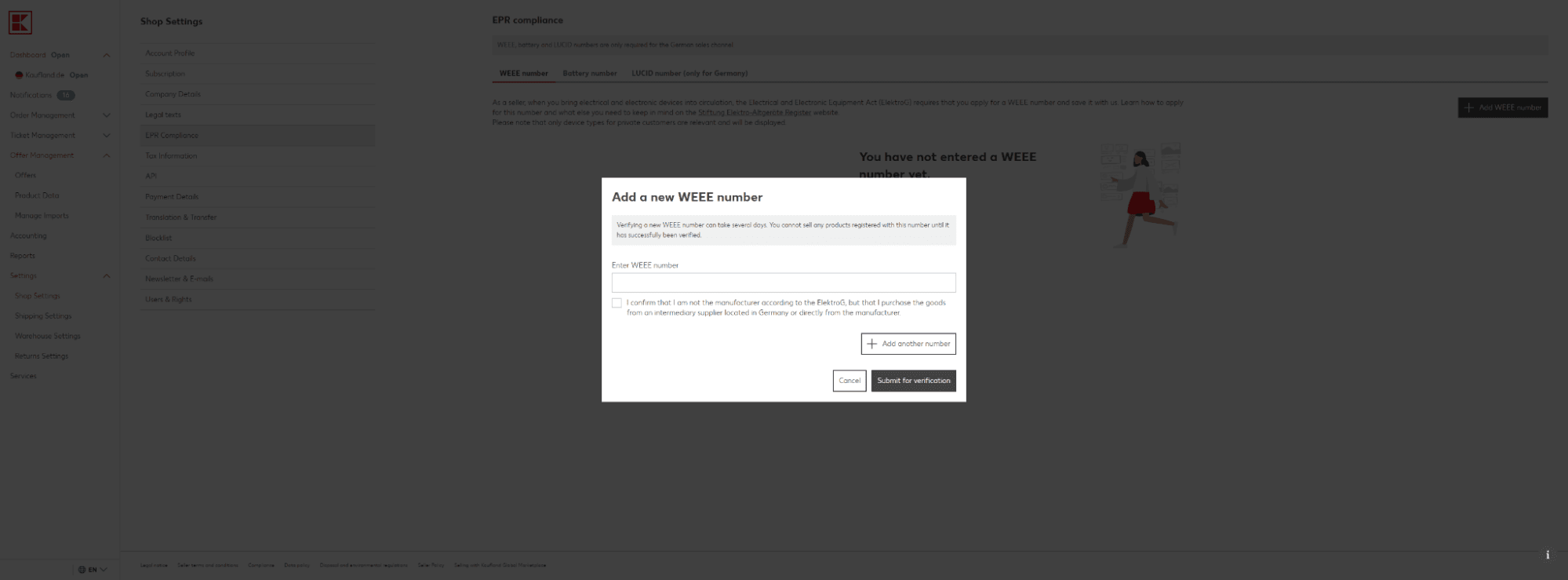
Warehouse location - WEEE and battery numbers: If you sell electronics or batteries, input your environmental registration numbers (WEEE compliance).
WEEE and battery numbers - Launch: Add at least one product offer to your catalogue and hit Activate Now.
How to create high-converting product listings
Setting up your listings properly is the single most important factor when launching on Kaufland. To beat the competition and turn clicks into customers, you need to focus on a few core areas:
Perfecting your product photography
Visuals make or break a sale in e-commerce. To win customers over, invest in crisp, high-resolution product photography that shows your items from multiple angles. Following Kaufland’s official guidelines will keep your account healthy:
- Minimum resolution: 1000 x 1000 pixels.
- Background: A pure white background is highly preferred as it creates a clean, distraction-free browsing experience.
- Close-ups: Macro shots and close-ups help customers understand the quality of the product, lowering return rates.
Writing compelling product descriptions
Your description should be clear, engaging, and packed with valuable information. Don’t just list what the item is – explain why they need it:
- Benefits first: What makes your product special? What problem does it solve for the buyer?
- Technical specifications: Clearly state dimensions, materials, ingredients, or weight.
- Usage guidelines: If your item requires assembly or special care, outline it transparently.
- Keywords: Naturally weave in high-volume search terms to ensure your listings index well in search results.
Optimising your product titles
Your title is the first thing a user sees. Keep it highly relevant, front-load the most critical keywords (like brand, model, and material), and ensure it reads naturally. Avoid keyword stuffing.
Setting the right pricing strategy
Your prices need to be competitive while preserving your margins. Research your direct competitors on Kaufland before launching. Remember, customers don’t just look at the item price; they look at the total cart cost, including shipping.
- Price benchmarking: Monitor what similar brands charge in your category.
- Promotions: Use limited-time discounts or promotional badges to make your listings pop in search results.
Configuring delivery options
Kaufland gives you the flexibility to manage shipping yourself (merchant fulfilment) or tap into external fulfilment networks. Whatever you choose, transparency is non-negotiable.
- Speed matters: Modern shoppers expect fast, reliable delivery. Keep your lead times as short as realistically possible.
- Free shipping incentives: Offering free delivery can give you a massive edge in the Buy Box, even if you have to slightly adjust your product price to absorb the cost.
Choosing the right product category
Make sure your products are mapped to the precise category nodes. Misclassified items won’t show up when shoppers use the sidebar filters, costing you easy sales.
Performance monitoring and ongoing listing optimisation
Your job isn’t done once the listings are live. Successful marketplace management requires regular analysis of your sales performance, tracking top sellers, and adjusting your descriptions and keywords to match seasonal search trends.
How to run effective Kaufland Ads
Kaufland features its own comprehensive retail media platform, allowing you to create, manage, and scale paid traffic campaigns. With Kaufland Ads, you can get your products in front of highly qualified buyers who are actively looking to buy right that second, placing your listings at the top of search result pages and on relevant product detail pages.
The most popular ad formats in Kaufland Ads:
- Sponsored Product Ads (Search results): These place your products at the very top of search results when a customer searches for relevant terms. This instantly boosts visibility and drives a massive influx of targeted clicks.
- Display Ads: These allow you to feature your brand and products on highly trafficked category pages and complementary product sheets, targeting specific customer personas.
- Product Ads (Category pages): Promote specific inventory within corresponding category tracks, boosting organic visibility where it matters most.
- Coupon Ads: Kaufland lets you highlight discount coupons within your ad placements, which dramatically increases click-through and conversion rates.
Optimising your advertising campaigns
To make sure your ad budget works hard for you, implement these core practices:
- Targeted keyword selection: Pick keywords that precisely match user search intent. Focus on high-converting, high-volume phrases that directly mirror what your product offers.
- Smart CPC bidding: Kaufland operates on a cost-per-click (CPC) model, meaning you only pay when someone actually clicks your ad. Balance your bids carefully – bidding too low will starve your ads of impressions, while bidding too aggressively can hurt your profitability.
- Budget control: Set strict daily and total campaign caps to protect your bottom line. Regular monitoring ensures you shift budget away from underperforming variants into your top earners.
- Data analytics: Keep a close eye on your Click-Through Rate (CTR), average CPC, and overall Conversion Rate. Continuous real-time optimisation allows you to respond to changing buyer behavior instantly.
The benefits of advertising on Kaufland
- Maximum visibility: Stand out immediately in a crowded, competitive landscape.
- Accelerated sales history: Driving paid velocity helps boost your organic ranking over time.
- Laser-focused targeting: Put your products directly in front of the consumers most likely to buy them.
- Total transparency: Clear attribution metrics let you track exactly what every pound spent generates in revenue.
Summary
Launching on Kaufland is one of the most effective ways to scale your e-commerce operations internationally. However, long-term success requires more than just listing your inventory – it demands highly optimised content, strategic pricing, efficient fulfilment, and sharp retail media management.
Want to scale your sales on Kaufland while avoiding the classic pitfalls? Contact the Raise Your Sales team today. Book your free consultation and let our marketplace experts unlock your brand’s full European potential!
Did you find this article helpful?
Average rating 5.0 / 5 — 3 votes
Autor
Wojciech Piszczek
CEO & Founder
I’ve been immersed in e-commerce for more than ten years, with a core focus on helping brands scale onto international platforms like Amazon, eBay, Kaufland, and eMAG. My experience covers the entire sales lifecycle—from high-level strategy and logistics to marketing and conversion optimisation. I help businesses not only enter new markets but scale sustainably, ensuring they avoid the costly pitfalls often faced by those just starting out.