
 Polski
 Čeština
 Slovenčina
 Deutsch
 Italiano
 Español
How to open an Amazon Seller account: Step-by-step guide
Amazon is one of the world’s largest marketplaces, giving businesses the opportunity to reach millions of shoppers online. For entrepreneurs looking to boost revenue and sell products online globally, registering an Amazon Seller account is an excellent first step. This process unlocks advanced tools like Fulfilment by Amazon (FBA) and Amazon Ads that help you manage your sales effectively. If you
 Aneta PiechotaE-commerce Sales Expert
Amazon isn’t just a marketplace; it’s a tool for building a business on solid foundations. Registering as an Amazon Seller is an investment in your future, opening doors to customers across Europe, the US, and many other regions. As experienced entrepreneurs often say, growth is the key to success. Amazon provides the ideal environment to achieve that growth, equipping you with the tools needed to operate in an international environment.
Registering a Seller account on Amazon involves several key stages, including identity verification and business detail configuration. Understanding these steps will help you navigate the registration process quickly and smoothly, so you can start selling. In the guide below, you’ll find detailed information on what to expect when setting up an Amazon account, what documents are required, and what to watch out for to avoid common pitfalls. Follow our tips, and your registration will be seamless, opening up exciting new sales opportunities.
Why sell on Amazon?
Amazon is a leading e-commerce platform offering businesses the chance to expand into international markets. For sellers, it’s an opportunity to build a global presence without the need for an in-house logistics infrastructure or navigating complex market entry processes. With the FBA (Fulfilment by Amazon) programme, you can outsource storage, packing, and shipping, making scaling your business significantly easier. This allows your products to qualify for Prime free delivery, eliminating logistical headaches and boosting your conversion rates. Furthermore, Amazon’s advertising tools allow you to target your audience precisely, increasing your listing visibility and driving sales.
However, before you can start trading, you need to open an Amazon Seller account. Selling on Amazon requires providing basic company details, passing identity verification, and supplying the relevant documents. It’s well worth preparing properly for this step to avoid delays and start selling on Amazon as quickly as possible.
Preparing to register your Amazon Seller Central account
Before you create an Amazon selling account, it’s wise to get everything ready to ensure a swift and smooth process. Gathering the necessary details and information beforehand will speed up account verification and let you launch your sales operations without a hitch.
Here is a checklist of items you need to prepare before opening an Amazon business account:
- Business email address: Dedicated solely to managing your Amazon account.
- Business name: The official company name registered in your national corporate documents (e.g., Companies House in the UK, Handelsregister in Germany, or the equivalent trade register in your jurisdiction). This will appear on invoices and within the Amazon system.
- Business type: Your legal business structure (e.g., sole trader, private limited company, public limited company). Amazon requires this to match legal and tax requirements.
- Amazon storefront name: The brand name customers will see when viewing your listings. It doesn’t have to match your legal business name.
- Credit card: A valid credit card (accepted internationally) for account fees.
- Identity document scan: A high-quality scan of the passport or national ID card of the person opening the account.
- Proof of address: A utility bill or bank statement matching the exact address provided during registration.
- Phone number: To be linked to your account for verification purposes.
- Company registration number / Tax ID: The official business identifier used in your country of registration.
- Bank account number: The account where your sales disbursements will be deposited.
- VAT number: Essential for operating on Amazon, particularly if you plan to scale and sell across international European markets.
- Company registration certificate: An official excerpt or certificate from your national business register to verify your business entity.
Having these documents fully prepared will expedite Amazon’s verification process and let you focus on the next steps, like creating your listings and configuring your storefront.
How to create an Amazon Seller account step by step
The specific link to start your registration depends on the primary marketplace you wish to target. For instance, you can sign up via sell.amazon.co.uk for the UK market or sell.amazon.de if you are targeting Germany. Once you navigate to the appropriate site, you’ll see the registration window. To begin the process, simply click the button labelled Sign up.
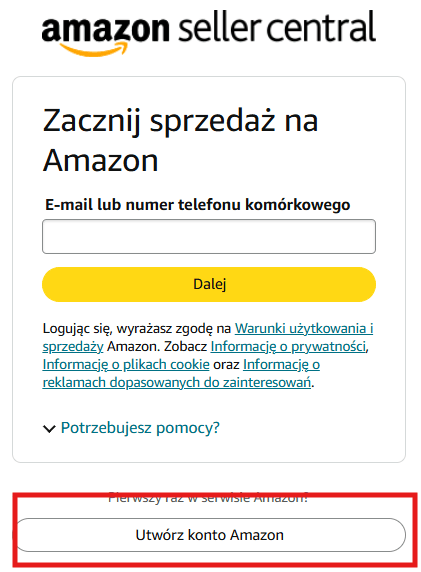
Sign up
After clicking the Sign up button, a new window will appear where you must provide your name, email address, and a password. If you already have a consumer account, you’ll need to use a different email address. Keep in mind that a business is only permitted to operate one Amazon Seller account.
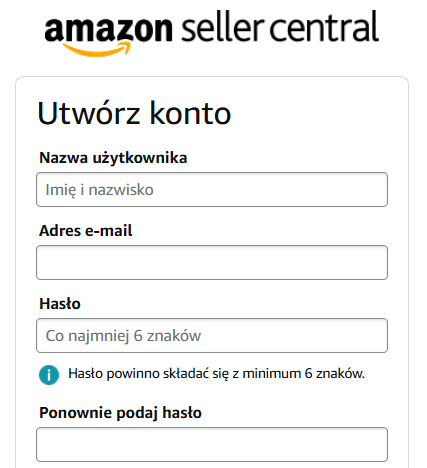
Name, email address and password
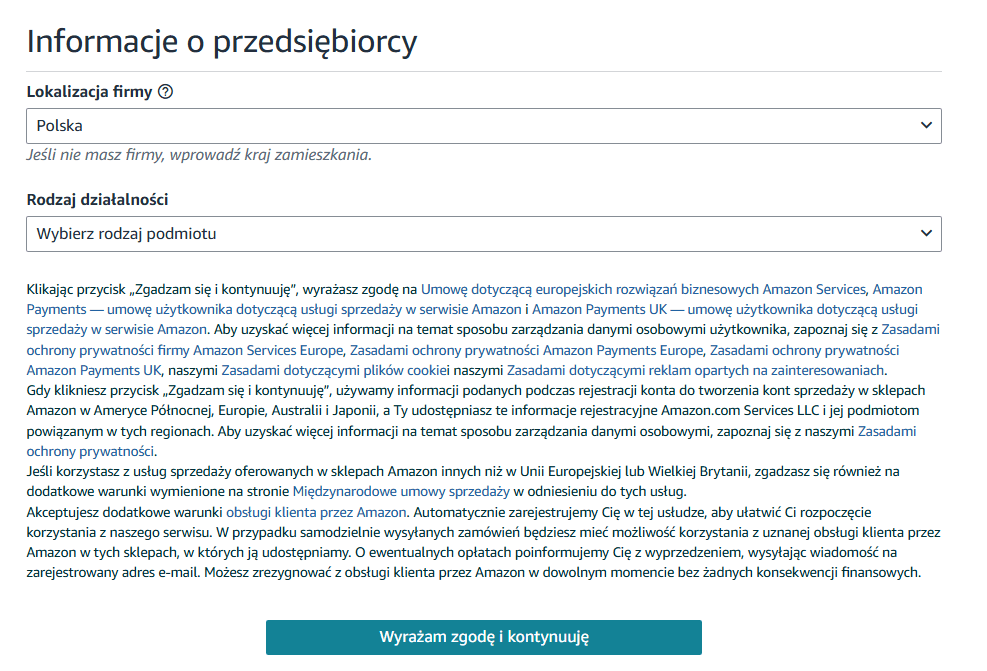
1. Business information
Once the basic details are filled in, you move on to the Business information section.
- Business location: Select the country where your business is registered.
- Business type: Specify your entity type, e.g., privately-owned business, state-owned business, or individual (sole trader).
- Amazon conditions of use: Before proceeding, you must read and accept the Amazon Services Europe Business Solutions Agreement, Privacy Notice, and other relevant policies.
Once you’ve filled in the details and ticked the agreement boxes, click Agree and continue to move to the next stage.
Business information
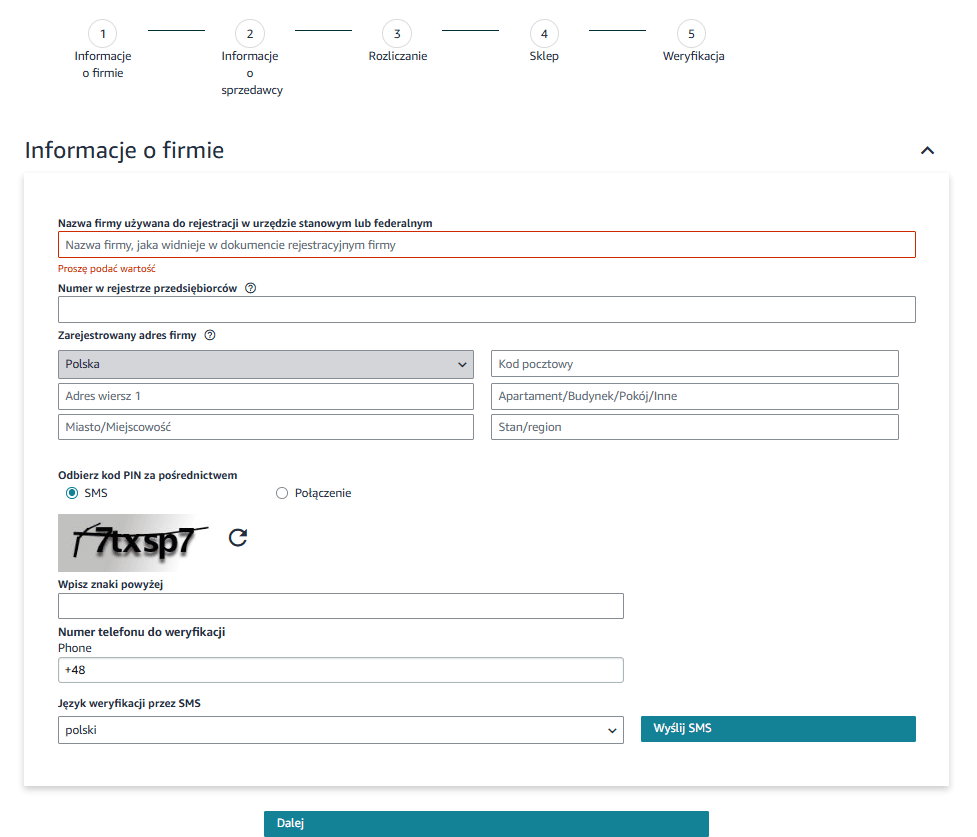
In the second step, you need to provide more specific company details. You must enter your legal business name (exactly as it appears on official documents) and your company registration number (such as your CRN in the UK, HRB number in Germany, or the relevant national identifier for your jurisdiction). Next, fill in your business address by selecting the country, city, postcode, and street address. The next phase is phone number verification, which can be done via SMS or an automated voice call. After completing the CAPTCHA and receiving your PIN, simply enter it and click Next to proceed.
Business information
Phone verification can be done in two ways:
- Automated call from Amazon: Select your country code, enter your phone number, and choose your preferred language. You can then opt for an SMS or a voice call.
- PIN message: You will receive a 6-digit PIN which must be entered into the form.
2. Seller information
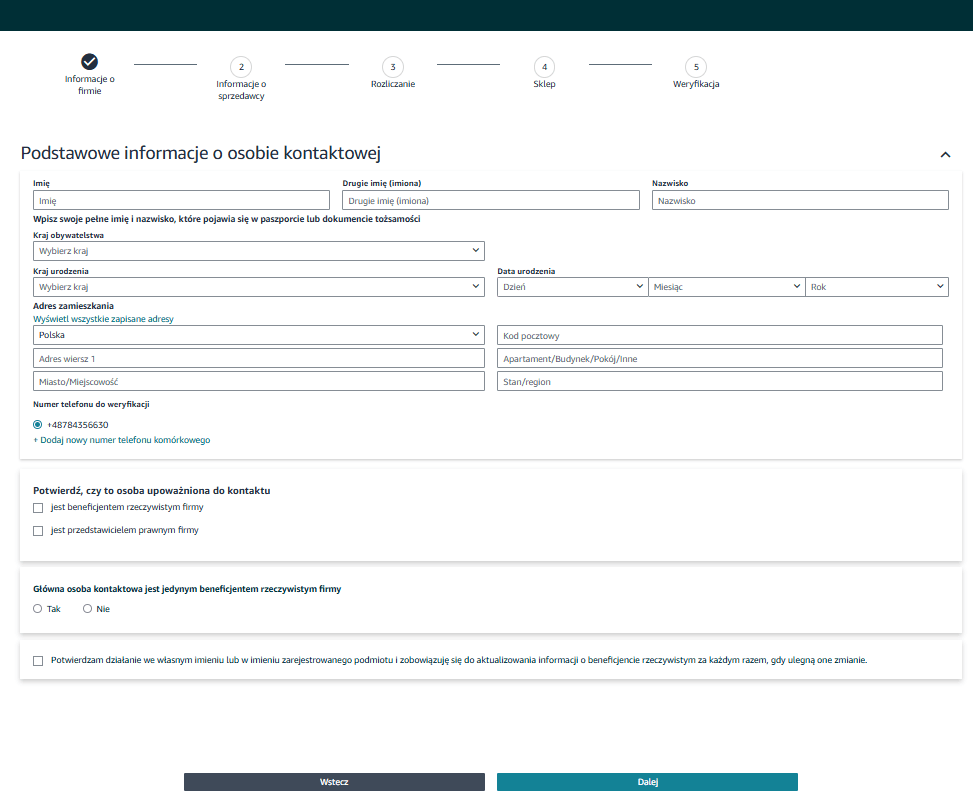
Next, you must provide the details of the primary contact person, matching their official ID document. This person provides registration information on behalf of the account owner (the registered seller). You must enter their first name, surname, country of citizenship, date of birth, and residential address. You must also declare whether this person is a beneficial owner or a legal representative of the business. Additionally, you must consent to updating this information if anything changes. Once completed, click Next.
Seller information
Note: According to Amazon’s policies, a beneficial owner is an individual who meets at least one of the following criteria:
- Owns the business.
- Holds at least 25% of the shares or voting rights in the company.
- Otherwise exercises control over the management of the business (e.g., as a key decision-maker).
3. Billing
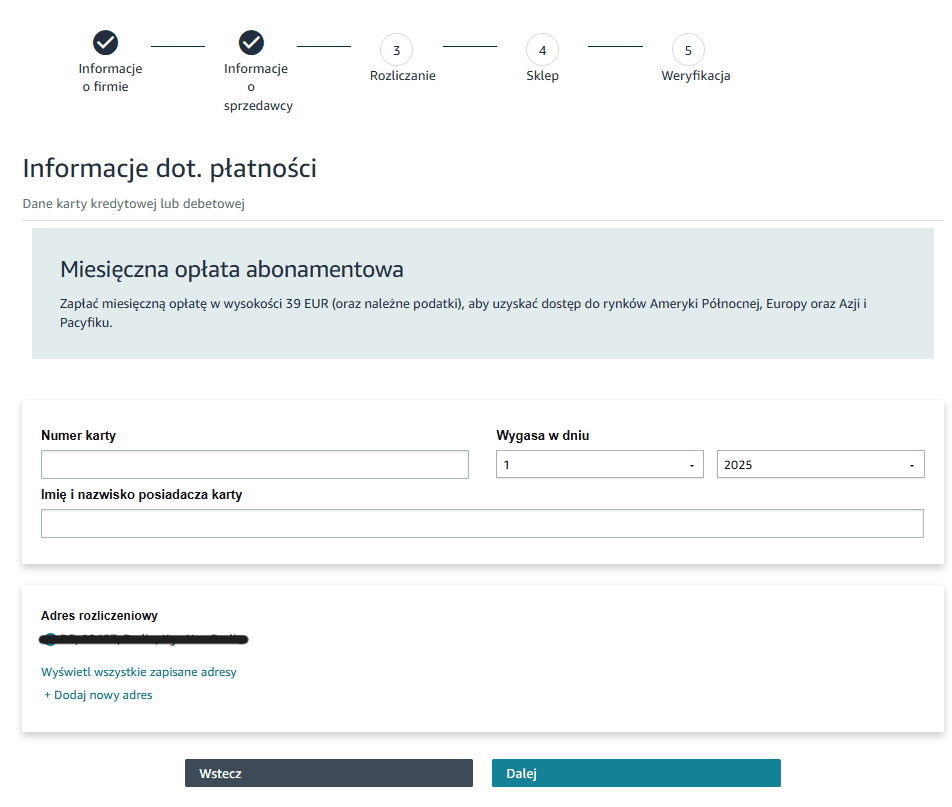
In the following step, you need to provide details of a credit or debit card that will be used to pay the monthly subscription fee of €39 / £25 (plus applicable taxes). You must enter the card number, expiry date, and the cardholder’s name. You also need to confirm the billing address or add a new one. Once the details are in, simply click Next to continue.
Billing
4. Store
Here, you provide your Amazon storefront name and information about your products. The store name doesn’t have to match the legal business name you entered at the start of the registration.
You must specify whether your products have universal barcodes (UPC, EAN, GTIN) and state if you are the brand owner, agent, representative, or manufacturer of the products you intend to sell. If you are a trademark owner, we highly recommend enrolling in the Amazon Brand Registry to protect your intellectual property and unlock premium branding features. After filling this out, you can move on to the final stage: account verification.
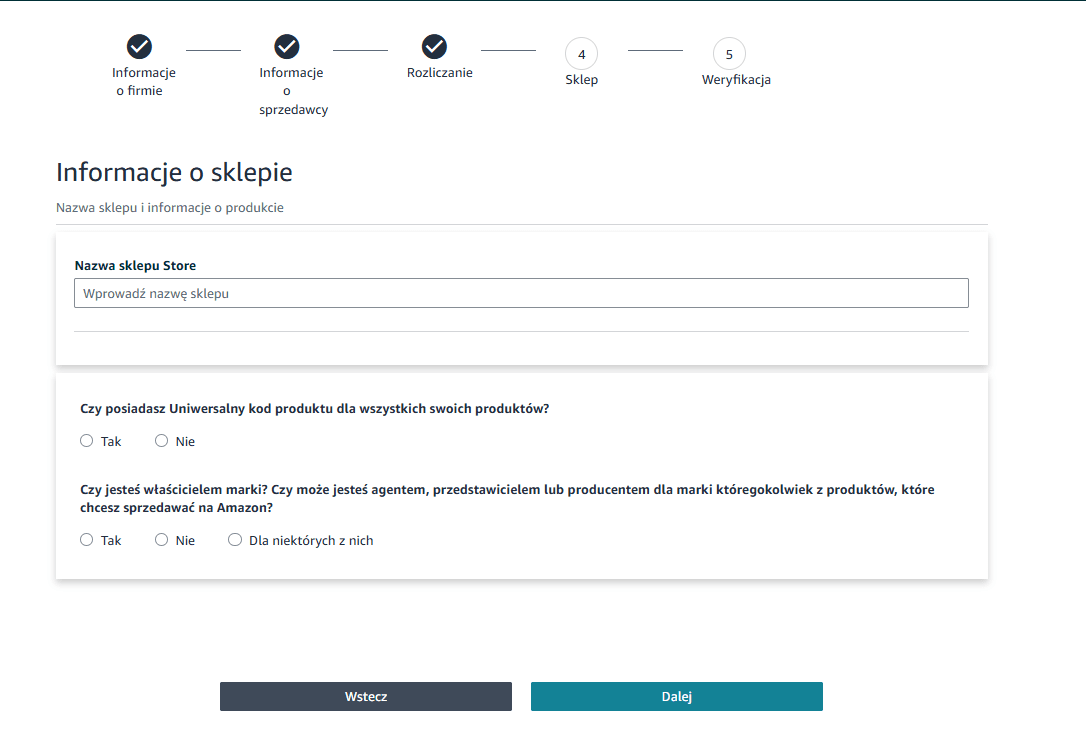
Store
Store
5.
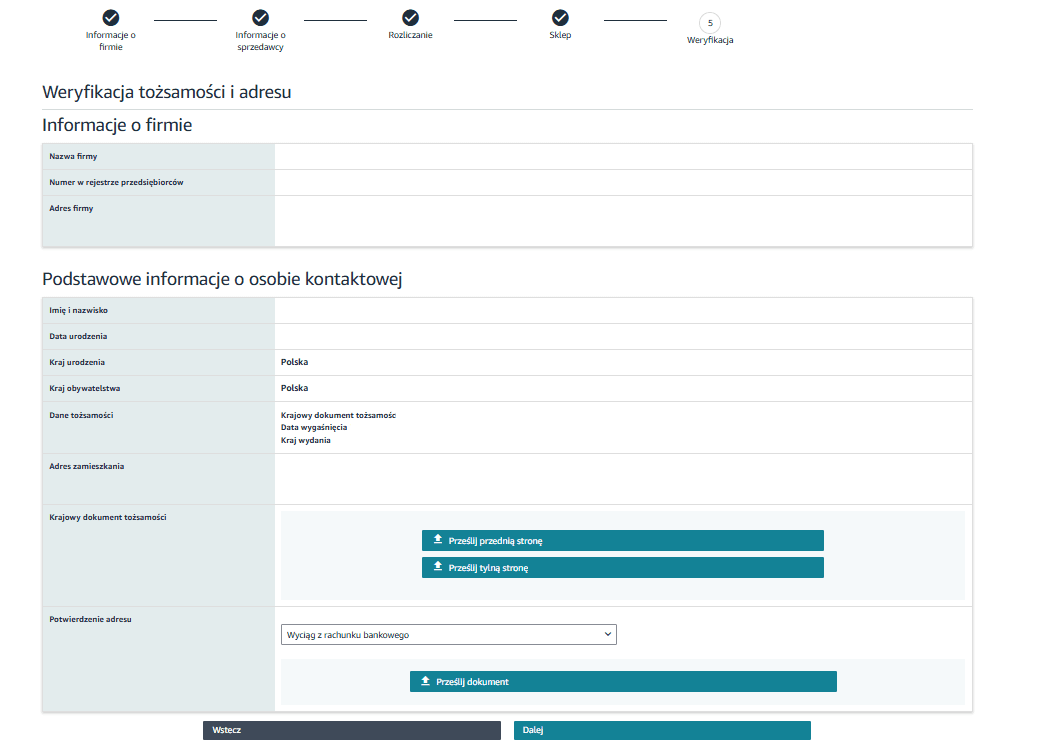
Verification
At this stage, Amazon requires identity verification for the account owner. You must upload a government-issued identity document (e.g., a passport or national ID card). This should be submitted by the person registering the account, acting as the ‘primary contact person’. The document must be valid – meaning it cannot be expired, blocked, or revoked. The details on it, such as the ID number and full name, must perfectly match the information provided during registration. The document must be uploaded in full, with all four corners visible in the scan or photo. It must be high-quality: in colour, legible, and completely free from any distortions like glare, blurriness, or cropping. Meeting these strict requirements is crucial for successful account verification.
You must also submit an additional document as proof of address. This can be a bank statement, for example. The document must be legible, recently issued (within the last 90 days), and match the registration details exactly. Amazon accepts PDF, JPG, or PNG formats. If there are discrepancies or errors, the platform may request further documentation.
Verification
During registration, a video verification is also required. This involves a brief video call with an Amazon associate where you show your original ID document. This process helps confirm the seller’s identity and the authenticity of the business. An alternative method is uploading a photo of the document alongside a clear photo of your face, allowing Amazon to match the details.
Once registration is complete, you can add a bank account directly within Seller Central by navigating to Settings > Account Info > Payment Information > Deposit Methods. Here, a seller can add a new account, update existing details, or verify the information entered. It’s vital that the account meets Amazon’s requirements, supports international transfers, and belongs to the Amazon Seller account owner. In some cases, Amazon might require extra verification by asking you to upload a bank statement.
Amazon registration: Common issues
Opening a Seller Central account on Amazon might seem straightforward, but many entrepreneurs run into technical, formal, or procedural hurdles. Here are the most common difficulties and how to resolve them:
Identity documents rejected
- The problem: Amazon frequently rejects submitted documents, such as a passport, ID card, or bank statement.
- The solution: Documents must be high-quality, clearly legible, and match the form data exactly. Amazon only accepts official government documents and unedited PDFs (note that screenshots or manipulated files are strictly prohibited).
Registration rejected due to data discrepancies
- The problem: The business or contact person’s details don’t match the documentation.
- The solution: The data must be absolutely identical to your official company registration documents. Do not use abbreviations or alternative spellings of names. If providing an address, ensure it matches your bank statement and business documents to the letter.
Trouble linking a bank account or payment card
- The problem: Amazon won’t accept the credit card or bank account provided.
- The solution: Ensure the card is active – check with your bank that it isn’t blocked or restricted from international or online transactions. The bank account must be held in a currency supported by Amazon Payments. Some banks block international transactions by default, so it’s always worth double-checking.
Account suspended immediately after registration
- The problem: Once registration is finished, Amazon suspends the account and demands further verification.
- The solution: Usually, Amazon requires additional paperwork, such as utility bills (electricity, water, internet) issued to the exact business name and address. However, if the account was suspended without a stated reason, you need to contact Amazon Seller Support.
Amazon: Individual or Professional account?
Choosing between an Individual and a Professional selling plan on Amazon depends entirely on your sales targets and business scale. Here’s what you need to know:
Individual plan:
- Designed for sellers planning to sell a low volume of products (under 40 items a month).
- No fixed monthly subscription fee – you only pay a per-item fee for every unit sold.
- Restricted access to tools; for instance, you cannot run advertising campaigns or pull advanced sales reports.
- A solid starting point for those just testing the waters on Amazon.
Professional plan:
- Aimed at sellers intending to trade on a larger scale (over 40 items a month).
- A fixed monthly subscription fee (in Europe, this is €39 or £25 per month, excluding VAT).
- Full access to advanced features, including Sponsored Products ads, Amazon FBA, comprehensive sales reports, and the ability to sell in restricted categories.
- The ability to list products that are not currently in the Amazon catalogue.
If you’re serious about selling on Amazon or want to leverage advanced features (e.g., the FBA programme, ads, promotions), the Professional plan is the superior choice. Starting with an Individual account can serve as a test run or suit those trading on a micro-scale. Remember, you can upgrade or downgrade your account plan at any time.
Which international markets are available on Amazon?
Amazon is a global e-commerce powerhouse, enabling you to sell in numerous countries worldwide. Currently, the platform operates across more than 20 marketplaces, spanning North America, Europe, the Middle East, and the Asia-Pacific region. This allows sellers to reach millions of buyers, massively expanding their business potential.
Amazon completely dominates the US, which represents its largest and most fiercely competitive e-commerce market. Germany, the UK, and Japan are also key territories where Amazon enjoys enormous popularity.
In Europe, the platform is growing dynamically, offering marketplaces in Germany, France, Italy, and Spain, alongside newer locations like Poland, Sweden, and Belgium. Selling across Amazon EU is streamlined by the Pan-European FBA programme, which lets you store and dispatch inventory to multiple countries without needing to set up local business entities in each one.
Amazon is also continuously expanding into the Middle East and Asia. Platforms in India, Saudi Arabia, and Singapore present fresh opportunities for sellers looking to tap into less saturated, rapidly growing markets.
Conclusion
Opening an Amazon Seller account is step one if you want to trade on one of the world’s most powerful e-commerce platforms. Registration involves a few formalities – you’ll need to prepare your company details, VAT number, and banking information, among other things. It’s also vital to select the right selling plan (Individual or Professional) and set up your account fully in line with Amazon’s strict requirements.
Once your account is up and running, it’s time to fine-tune your Amazon store. Well-crafted product pages, compelling descriptions, professional imagery, and a shrewd pricing strategy are crucial. You must also strictly adhere to Amazon’s policies to avoid issues like account suspension. Long-term success on Amazon boils down to continuous performance analysis and adapting your strategy to an ever-shifting market landscape.
Want to sell effectively on Amazon and outshine the competition? Get in touch with us! We provide comprehensive Amazon account management – we’ll guide you through registration and setup, optimise your listings, and build a strategy that drives your profits upward!
Did you find this article helpful?
Average rating 5.0 / 5 — 1 vote
Autor
Aneta Piechota
E-commerce Sales Expert
I’m a marketing and e-commerce enthusiast with over four years of marketplace experience. I specialise in the Amazon ecosystem, particularly in high-performance advertising. During my career, I’ve also worked with Allegro, where I scaled sales for a private-label brand. I hold a degree in Logistics Engineering, and outside of the office, I practice yoga and have a keen interest in psychology, which helps me understand the “why” behind consumer behaviour.