
 Polski
 Čeština
 Slovenčina
 Deutsch
 Italiano
 Español
Allegro offer tags: Keep your listings organised!
A well-organised product catalogue on Allegro benefits both sellers and buyers. Allegro offer tags give you the tools to keep your storefront clear and easy to navigate. It is crucial to quickly categorise your inventory using your own custom structure, which is exactly what tags allow you to do with your product portfolio. In this article, you will discover the benefits of building a well-organis
 Kamil MarczukE-commerce Sales Specialist
Allegro is one of the largest e-commerce platforms in the CEE region, offering sellers an incredible opportunity to reach millions of potential customers. To effectively build brand awareness on the platform, you need to ensure your Allegro storefront is top-notch. One of the key features that can help elevate the shopping experience for your brand’s buyers is offer tags. In this article, I will explain how to effectively use tags on Allegro and how to optimise your listings to attract more buyers.
What are offer tags on Allegro?
Offer tags are essentially keywords that help customers easily find the products they are looking for through Allegro’s search engine. Tags allow you to precisely indicate which category a given product belongs to, which adds clarity to your listings and improves the overall shopping experience. Using the right tags helps you manage your catalogue better, ultimately increasing your visibility among users searching for specific items. Remember to manage your tags wisely – you are limited to 100 tags per account, and each tag can contain a maximum of 25 characters.
How do tags help with filtering listings?
The tags you add to your listings will create new categories within your Allegro storefront, making navigation a breeze for potential customers. They are incredibly useful when it comes to filtering listings. By using them, customers can easily narrow down their search results and pinpoint exactly what they want. If you sell products across various categories, well-chosen tags will help your listings stand out from the competition. For instance, if you run an electronics store, it is worth adding tags related to the brand, product type (e.g., “smartphone”, “charger”), and specific features (e.g., “wireless”, “fast charging”).
Is adding tags to your listings free?
Unfortunately, no. To add tags to your listings, you need an active Allegro subscription. This feature is available to business sellers who use one of the platform’s paid subscription plans. Since every subscription tier unlocks the ability to add tags, we recommend starting with the cheapest Basic Subscription at PLN 49.00 per month.
Once you have the subscription, the next step is properly planning your tag structure. As mentioned earlier, the tags you attach to your listings will act as new categories in your Allegro storefront, significantly streamlining navigation for your potential buyers.
The benefits of using tags
- Better listing visibility: Carefully selected tags make your products easier to find, expanding your reach to a larger pool of potential customers. This directly increases your chances of making a sale.
- A streamlined customer journey: Tags are displayed as categories within your Allegro storefront. This keeps your catalogue neatly organised, which positively impacts the customer shopping experience.
- Building brand awareness: A customer who visits a well-organised storefront is much more likely to return. A high-quality shopping experience fosters brand loyalty and awareness.
- Easier listing management: Tagging your products can help you better organise your listings, making future edits much easier and keeping your seller account tidy.
Which tags should you add to your listings?
To get the most out of tags, there are a few golden rules to keep in mind. First and foremost, focus on words that best describe the product you are offering. You can include tags related to the brand name, product type, key features, and its intended use. It is crucial to choose tags that are popular and frequently searched for by buyers.
The tag should closely match the characteristics of the product in your listing. For example, if you sell eco-friendly goods, incorporating tags like “eco”, “natural”, or “organic” will boost your chances of reaching the right audience.
Adding and managing tags – a step-by-step guide
Managing offer tags on Allegro is straightforward. The first method is to use the dedicated Offer tags tab on the left-hand side of the Allegro Sales Center. In this tab, you can view, hide, edit, and delete existing tags, as well as create new ones. You can also rearrange their order by dragging a tag to your preferred spot in the list.
To add a tag, simply click Add new on the right side of the section. A pop-up window will appear where you can type in your phrases and confirm by hitting Save.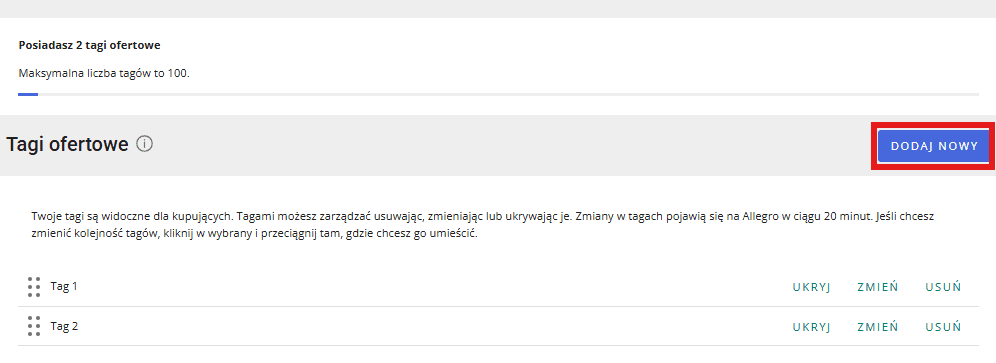
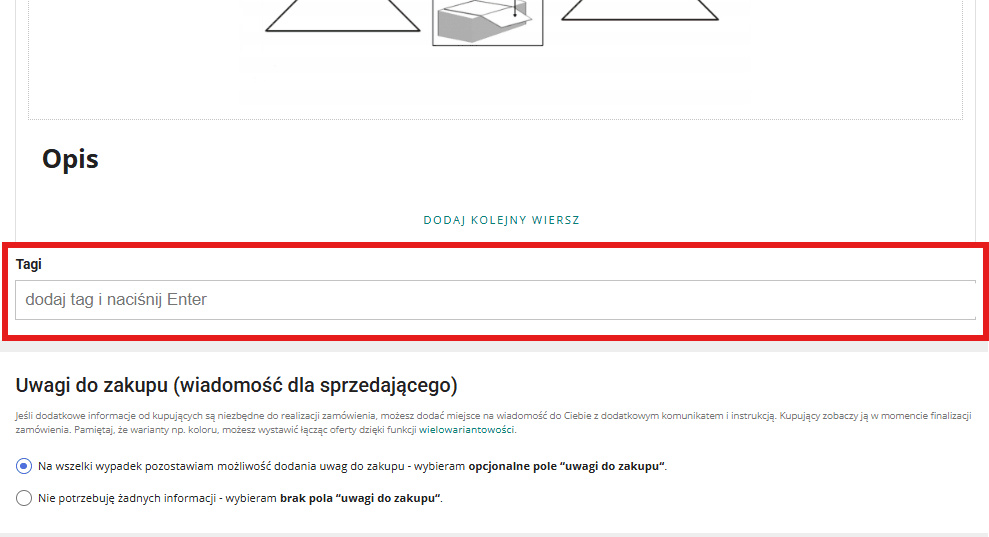
The second option is to add tags directly within the listing creation form. After filling out all the product details, scroll down to the Tags section below the listing description. Here, you can type in your custom tags and confirm each one by pressing Enter.
Always remember that your tags must comply with Allegro’s policies – ensure they do not contain spelling mistakes or prohibited words.
Hiding tags and their impact on sales
Some sellers might wonder if it makes sense to hide their tags. The answer is clear: hiding tags can negatively impact your listings’ discoverability. Tags ensure proper product classification, making it easier for customers to navigate your storefront. It is important to keep your tags visible and packed with relevant information that answers your customers’ questions and helps them find exactly what they are after.
Conclusion
Offer tags are an essential tool for sellers looking to boost customer loyalty and maintain a tidy storefront. Proper listing tagging expands your reach to a broader audience, improves your product ranking, and ultimately drives sales success. When using tags, ensure they are high quality, accurately reflect the product, and are updated regularly. Only then will your listings truly stand out from the competition and effectively draw in buyers.
Ready to grow your e-commerce business? Whether you are expanding into the CEE region via Allegro or targeting Western marketplaces like Amazon and eBay, our experts at Raise Your Sales are here to help. Book a free consultation today and let’s scale your marketplace sales together!
Did you find this article helpful?
This article has no ratings yet — be the first.